Dimforge Q1 2026 technical report − GPU compute with khal, vortx, inferi

🐰 Happy Easter Holiday everyone! 🐰 This article summarizes the most significant additions made during the first quarter of 2026 to our open-source crates for cross-platform GPU compute that we develop for the Rust community.
The first quarter of 2026 has been very exciting as we are laying out the foundations of our upcoming cross-platform GPU physics libraries. We are introducing new crates:
- Khal: abstraction layer for cross-platform compute on GPU and CPU.
- Vortx: cross-platform GPU tensor library for general linear algebra.
- Inferi: cross-platform GPU inference library.
All these libraries are also compatible with browsers running WebGpu. Physics simulation is still cooking and will be the main highlight of our next update for Q2 2026.
All the presented work is still early and experimental. We are still in the process of figuring out the best APIs. Expect rough edges, breaking changes, as well as a general lack of reliable tutorials/documentation for now.
Khal: write once, run on WebGpu, Cuda, and CPU
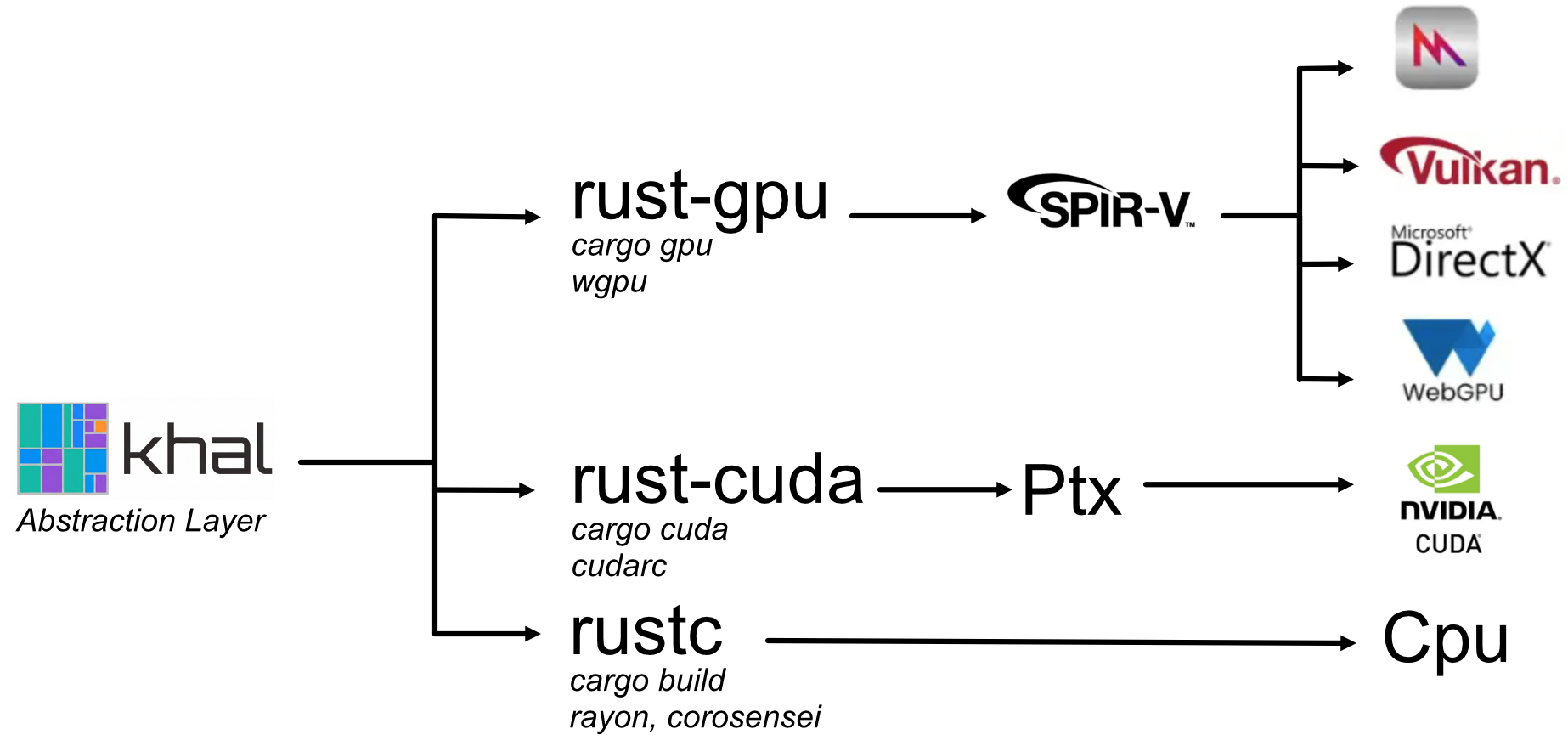
Khal (meaning "Kompute Hardware Abstraction Layer") facilitates writing Rust code once and have it run on Vulkan, Metal, DirectX, WebGPU, CUDA, and the CPU. It can be seen as a wrapper around very strong tooling developed by the community. For the Rust-to-GPU conversion it wraps:
- rust-gpu: for compiling Rust code to SpirV.
- naga: for transpiling SpirV to target Metal, DirectX, Vulkan, WebGpu.
- rust-cuda: for compiling Rust code to Ptx (Cuda’s IR).
On the host, it wraps:
- wgpu: for initializing resources and running shaders on all gpu platforms over than Cuda.
- cudarc: for initializing resources and running shaders on Cuda.
- rayon and corosensei: for running the shaders on the CPU directly. It uses parallel iterations to run workgroups in parallel, and coroutines for running threads from the same workgroup concurrently. The CPU target is currently very inefficient so it is mostly relevant for debugging.
The general idea is that you write two crates. A no-std crate holding your shader code that will get compiled by
rust-gpu and rust-cuda. And a second crate for holding all your application logic, gpu resource allocations, and shader
calls orchestration.
The key is that by abstracting all the elements mentioned above, khal allows you to write both crates only once independently of your target (and 100% in Rust). If it works on any target (and, in particular the CPU target which is the easiest to test and debug), you can be fairly confident it will work everywhere unless you hit some unexpected platform-specific edge cases. Khal only focuses on compute shaders. Any rendering-specific shaders (vertex shader, fragment shader, etc.) are out of scope.
Let’s have a quick look at the khal-example and khal-example-shaders example pair. The shader crate for calculating the sum of two vectors is fairly straightforward:
#![cfg_attr(target_arch = "spirv", no_std)]

use khal_std::glamx::UVec3;
use khal_std::macros::{spirv_bindgen, spirv};

#[spirv_bindgen]
#[spirv(compute(threads(64)))]
pub fn gpu_add_assign(
    #[spirv(global_invocation_id)] invocation_id: UVec3,
    #[spirv(storage_buffer, descriptor_set = 0, binding = 0)] a: &mut [f32],
    #[spirv(storage_buffer, descriptor_set = 0, binding = 1)] b: &[f32],
) {
    let thread_id = invocation_id.x as usize;
    if thread_id < a.len() {
        a[thread_id] += b[thread_id];
    }
}
If you are already familiar with rust-gpu, this should look like what you are used to, except for two details:
- We are importing the
spirvmacro andUVec3throughkhal_stdinstead ofspirv_std. This is becausekhal_stdhides the details of conditional compilation betweenspirv_stdandcuda_stddepending on the target platform. - We are calling the
#[spirv_bindgen]proc-macro. This is a new macro introduced bykhal_stdthat runs compile-time reflection for generating strongly typed interfaces between the device kernel and rust on the host. In particular, it generates aGpuAddAssignstructure (same name as the entrypoint but in PascalCase) with a::callmethod that expects strongly typed gpu buffers for launching the kernel.
Now let’s look at the host-side code:
use khal::backend::{Backend, Buffer, Encoder, GpuBackend, GpuBackendError, WebGpu};
use khal::re_exports::include_dir::{Dir, include_dir};
use khal::{BufferUsages, Shader};
use khal_example_shaders::AddAssign;

static SPIRV_DIR: Dir<'static> = include_dir!("$CARGO_MANIFEST_DIR/shaders-spirv");

#[derive(Shader)]
pub struct GpuKernels {
    add_assign: GpuAddAssign,
}

#[async_std::main]
async fn main() {
    let webgpu = WebGpu::default().await.unwrap();
    let backend = GpuBackend::WebGpu(webgpu);

    // Run the operation and display the result.
    let a = (0..10000).map(|i| i as f32).collect::<Vec<_>>();
    let b = (0..10000).map(|i| i as f32 * 10.0).collect::<Vec<_>>();
    let result = compute_sum(&backend, &a, &b).await.unwrap();
    println!("Computed sum: {result:?}");
}

async fn compute_sum(
    backend: &GpuBackend,
    a: &[f32],
    b: &[f32],
) -> Result<Vec<f32>, GpuBackendError> {
    // Generate the GPU buffers.
    let mut a = backend.init_buffer(a, BufferUsages::STORAGE | BufferUsages::COPY_SRC)?;
    let b = backend.init_buffer(b, BufferUsages::STORAGE)?;

    // Dispatch the operation on the gpu.
    let kernels = GpuKernels::from_backend(backend)?;
    let mut encoder = backend.begin_encoding();
    let mut pass = encoder.begin_pass("add_assign", None);
    kernels.add_assign.call(&mut pass, a.len(), &mut a, &b)?;
    drop(pass);
    backend.submit(encoder)?;

    // Read the result (slower but convenient version).
    backend.slow_read_vec(&a).await
}
A few elements are worth noting here:
- Depending on the selected backend
GpuBackend::WebGpu,::Cuda, or::Cpu, the created buffer’s underlying type will be respectively awgpu::Buffer, aCudaBuffer, or a simpleVec. - The
kernels.add_assign.callfunction is strongly typed. For example if you changed the type ofa: &mut [f32]toa: &mut [u32]on the entrypoint definition, you will get a compilation error (type mismatch) at the.callsite. Same with const-correctness, if the shader expects&mut [T], you must provide a&mutreference to your gpu buffer to the.callfunction. - The
SPIRV_DIRstatic constant embeds all the compiled spirv/ptx shaders in your executable. This makes it standalone, and, in particular, simplifies serving it on the web as a single wasm file. It is also used by default by the#[derive(Shader)]macro for finding and instantiating the compute pipelines.
The strong typing eliminates extremely hard-to-debug bugs that would arise if there was any silent mismatch between the
gpu kernel’s inputs and your gpu buffers. This would typically arise after some refactoring or changes to the shader
entrypoint signature. Here, the compiler will prevent you from forgetting to update the .call function arguments.
The host crate also has a build.rs file for triggering the compilation of the shaders whenever you are
compiling your rust crate. The compilation is done by calling the cargo gpu
CLI (when targeting spirv/wgpu), or the cargo cuda CLI
when targeting PTX/Cuda. Note that we have only tested cargo cuda on a Windows machine for the moment. So your
experience may vary on Linux. Both executables are responsible for handling the toolchains specific to rust-gpu and
rust-cuda. You need to install them prior to compiling your shaders:
# Install the cargo subcommands
cargo install cargo-gpu --version 0.10.0-alpha.1
cargo install cargo-cuda

# Install the toolchains used by both commands
cargo gpu install
cargo cuda install
The build.rs is fairly straightforward but lacks configurability at the moment. It is responsible for running cargo gpu
and cargo cuda automatically for you:
use khal_builder::KhalBuilder;

fn main() {
    // Relative path to the shader crate’s directory.
    let shader_crate = "../khal-example-shaders";
    // Relative path where the compiled spirv and ptx files will be generated.
    let output_dir = "shaders-spirv";

    KhalBuilder::new(shader_crate, true)
        .build(output_dir);
}
Finally, note that the GPU resources created through khal aim to remain as transparent as possible: they are merely
enums containing the underlying GPU resource from the backend’s API. So you are always able to break free of khal’s
thin abstractions if you need more control, for example to reuse your buffers for a separate rendering library based on wgpu,
or to use your CUDA buffers as inputs to third-party libraries like cublas.
Vortx: cross-platform GPU tensors

Vortx is a tensor library where each tensor can have rank up to 4 under the NCHW format (Batch/Batch/Rows/Columns). The rank is bounded to keep the GPU-side code simpler while covering most scientific computing use-cases. It provides simple ways to initialize tensors and manipulate their shapes. Some common general-purpose tensor operations are provided. Keep in mind that some of these operations are not optimized as much as they could be yet.
- componentwise operations: add, mul, sub, div, copy, inv.
- reductions: sum, product, min, max, squared norm.
- matrix multiplication: naive and tiled
gemm.
Inferi: cross-platform GPU inference

It turns out that implementing LLM inference is an excellent way to stress-test and benchmark linear-algebra operators, and, in particular, all the libraries described above. Moreover, because inference operates mostly on primitive types, it is an easy starting point without having to worry too much about GPU/CPU data layouts (as opposed to physics that relies on a ton of more complex custom types).
Inferi is an inference library that implements a modest number of common operators and a couple of models (namely Llama,
Qwen, and Whisper). The main objective is to explore writing inference kernels once and run them on all platforms, as opposed
to popular frameworks like llama.cpp and candle that rely on rewriting every operator again and again for each
different possible target (Metal, Cuda, Vulkan, etc.) The implementation has not been optimized too much yet, so we are
not in par with llama.cpp or candle performance-wise yet.
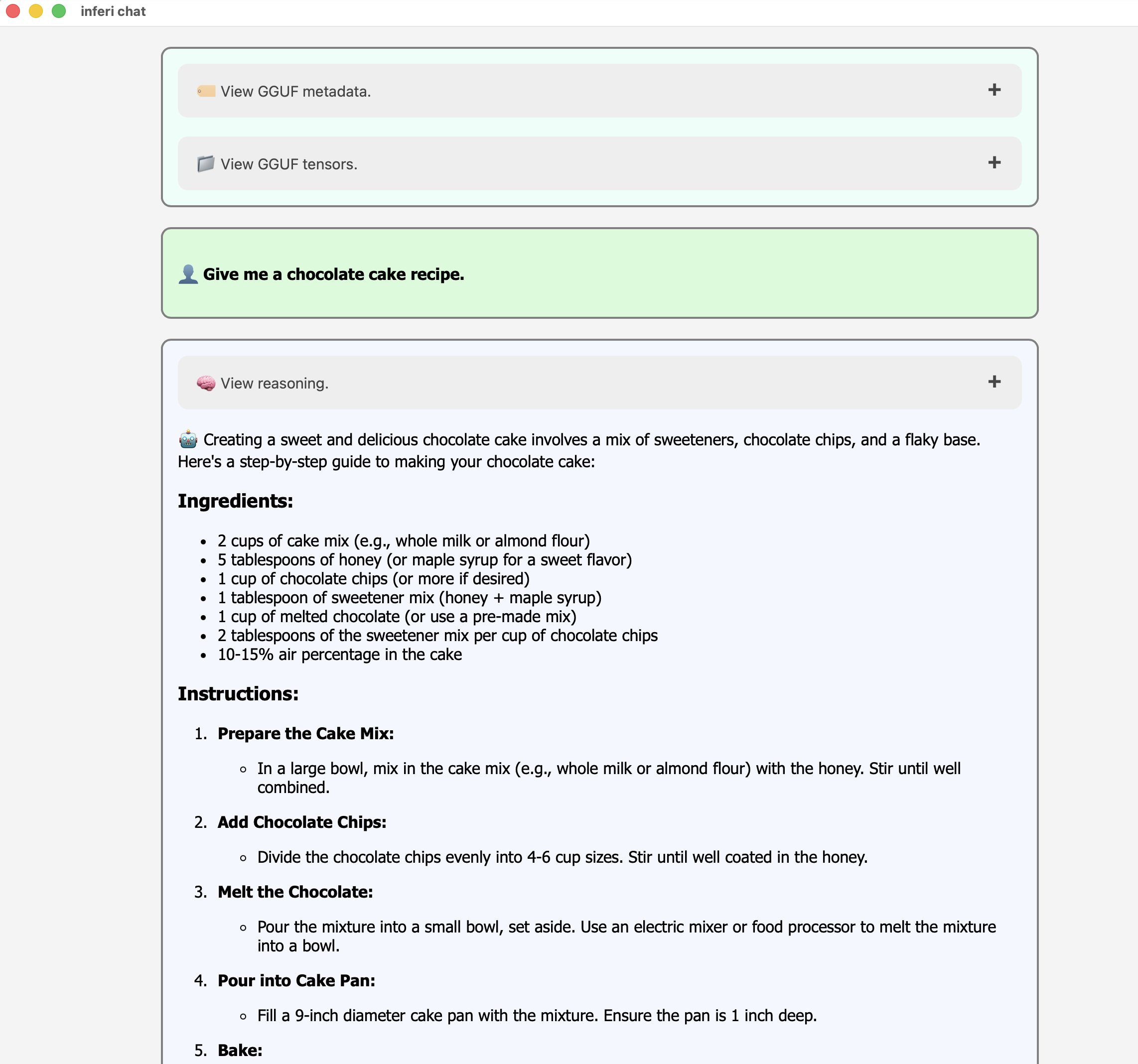
Inferi comes with a web-compatible GUI application and CLI inferi-chat that runs inference locally
after loading a GGUF file. The inferi-whisper-chat CLI does the same but uses voice transcription for the user prompt.
Note that the application is mainly here for testing and demoing. Inferi is more about implementing the gpu operators
rather than creating an end-user application.
The Inferi codebase is still a bit messy so it might be unclear how to setup a complete inference loop from your own
project. The easiest path forward would be to look at the inferi-chat binary’s source code.
How about physics?
As promised in our 2026 newsletter, we are working on porting to Rust-GPU the GPU physics work we started in WGSL (see wgrapier). Our current plan for Q2 is to open-source a migration of our WGSL codebase to Khal in May and then continue improving the implementation by sharing more code with the no-std part of the Rapier and Parry codebases.
But our long-term objective doesn’t stop there: we intend to create a full GPU multiphysics system, somewhat similar to Genesis or Newton; all 100% in Rust thanks to Khal, Rust-GPU, and Rust-CUDA.
Conclusion
This first quarter has been a very exciting opportunity to strengthen the foundations of our philosophy of writing GPU code once, and have it run on most platforms (including the web). Despite just being at the beginning of this journey, the developer-experience massively improved compared to our former experiments with WGSL and Slang. We are looking forward to release a first version of our GPU physics engine within the next couple of months.
We cannot thank enough:
- Futurewei for sponsoring our work on cross-platform GPU scientific computing.
- The maintainers of all the fantastic libraries we build on top of.
Thanks to all the former, current and new sponsors! This helps us tremendously to sustain our Free and Open-Source work. Finally, a huge thanks to the whole community and code contributors!
Help us sustain our open-source work by sponsoring us on GitHub sponsors or by reaching out ♥
Join us on discord!