Advanced soft-bodies for games with the Rapier physics engine

In Rapier v0.36.0, we added extensive support for soft-body simulations. Surprisingly, we didn’t find a lot of documentation and precedent from existing game physics engines on that topic. So we would like to share the techniques we implemented in Rapier as we believe it results in a uniquely powerful feature set. Hopefully, this will help game developers create more exciting gameplay leveraging deformable physics, and inspire other physics engine developers to further research and improve the support of soft-body physics within the industry.
🤖 AI disclaimer: the text of this entire blog-post is hand-written. Only the schematics were created with AI assistance.
Rapier is a Free and Open Source physics engine for games, animation, robotics, written with the Rust programming language. For years, we focused on rigid-body physics only: objects that cannot deform in any way. Due to popular requests from the community, we finally integrated deformable bodies: cloth, jelly, ropes, etc. Rapier’s implementation of deformable objects is very versatile, and interacts with all the other engine features with little to no restrictions. For example, you can:
- Attach any type of
ImpulseJoint(revolute, prismatic, fixed, generic 6-dofs, etc.) to soft-bodies. Meaning that you can attach two soft-bodies by joints, one soft-body and one rigid-body, as well as attach a soft-body to a multibody. It all works seamlessly and with the same API as you are used to. - Attach deformable and non-deformable colliders to soft-bodies. Sensor colliders can be deformable too.
- Skinning: use a deformation lattice that is different (often lower-resolution) from the collision-detection or visual mesh while having the collision/visual mesh follow the deformations.
- Control parts of the soft-body kinematically.
Our soft-bodies implementation works on the web too! You can play with them on our online demos. Soft-body demos can be selected from the demo list:
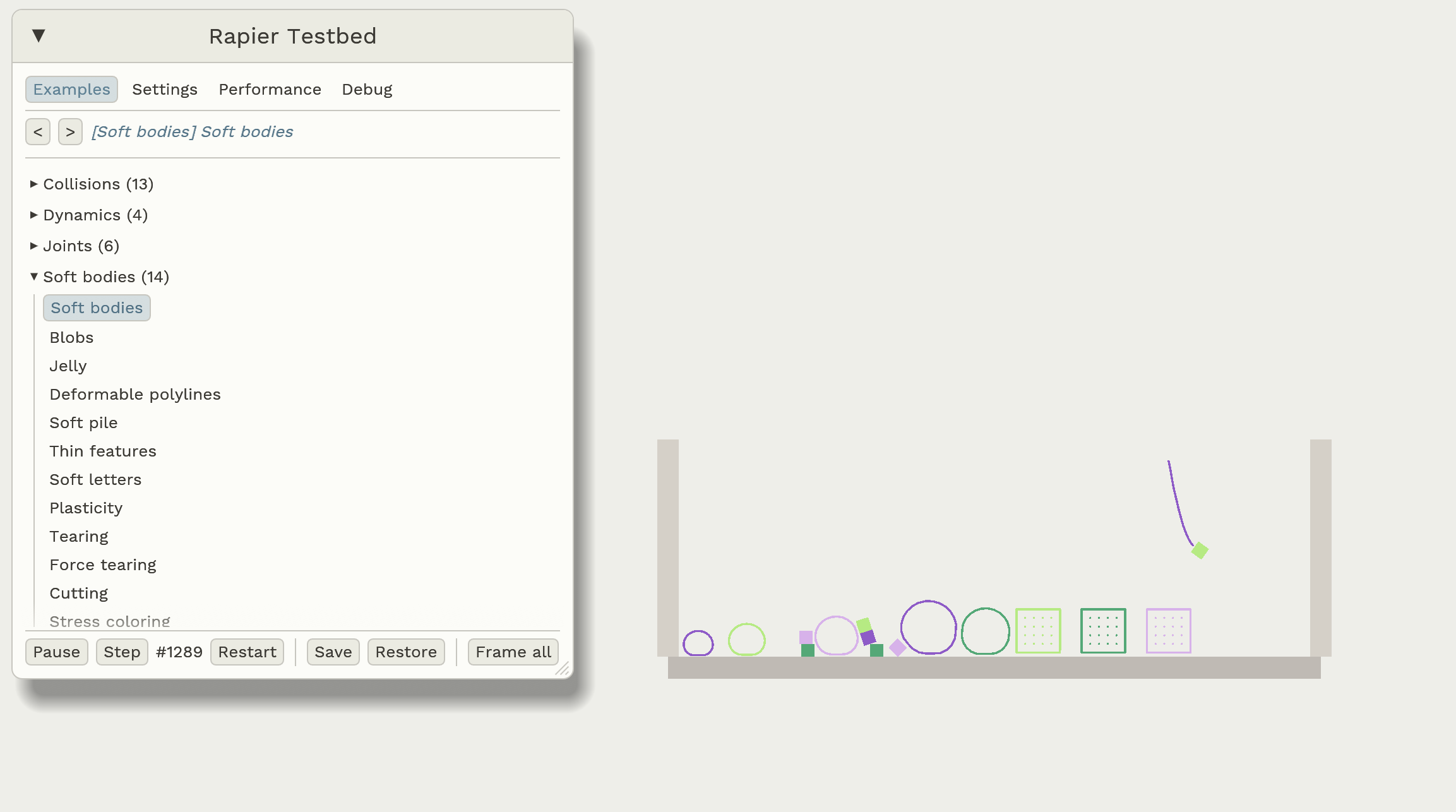
In this article, we won’t dive into API details (refer to the user-guide for that). We will focus on the core modeling choices, challenges we faced, and literature we recommend looking at if you are interested in implementing your own soft-bodies system. Our technological choices were guided by the following priorities:
- Ergonomics: the API should integrate nicely with what we already have.
- Stability: the simulation should, as much as possible, never break down. Meaning that it should not suddenly explode, or start making objects fly away uncontrollably. This is actually surprisingly difficult to achieve with deformable physics.
- Control: games need control over the objects they are working with to fit gameplay that does not necessarily agree with real-life physics.
- Performance: the simulation should be fast, not perfect. Some very advanced algorithms and solvers can eliminate whole classes of difficulties we will discuss (e.g. penetrations of deformable meshes), but are too computationally expensive to be actually usable in games.
This is the first time soft-bodies are released in Rapier. So, we wouldn’t be surprised if you encounter edge-cases we haven’t thought of. Feel free to share your experience on Discord and to open issues on the Rapier repository.
Definition of a soft-body
Let’s start with the definition of a rigid-body: it is a moving point in space (x,y,z) and an orientation (rotation matrix/quaternion), totaling 6 Degrees Of Freedom (DOFs) in 3D and only 3 DOFs in 2D. No matter how complex a rigid-body shape (its colliders) is, from the dynamics perspective it can entirely be represented as a single oriented point in space. In other words, a rigid-body is a moving coordinate frame: the location and movement of any point of the rigid-body can be expressed implicitly from the location and movement of that frame. This is what makes it so cheap and easy to implement and control.
A soft-body is more complex because a single moving frame isn’t enough: deformations require parts of the body to be capable of moving (somewhat) independently of the other parts. Instead, a soft-body is made of several mass points (aka. particles) where each mass point is a point (x,y,z) in space without any orientation. Each particle has 3 DOFs in 3D (or 2 DOFs in 2D), so the more particles a soft-body is made of, the more degrees of freedom it has, the more detailed and smooth the deformations can be.
A soft-body also needs a way of keeping these particles together to form a single cohesive object. In Rapier, you can define a lattice made of points (the mass points), edges (connecting two points), and cells (connecting 3 or 4 points). The only mandatory elements are the mass points; the rest can be added optionally depending on how you want the deformations to behave.
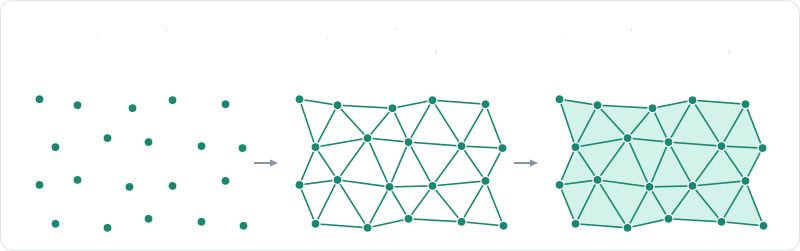
Note this is just a choice of soft-body representation we made for Rapier. Other physics engines might model soft-bodies differently depending on the mathematical methods they implement and the performance/realism compromises they choose.
Rapier supports three ways of modeling forces preserving the cohesion of the soft-body: shape-matching, constraints, and the Finite Elements Method (FEM).
Shape-matching
Main reference: Meshless deformations based on shape matching (Müller, et al.)
Shape-matching is the simplest approach that only needs the soft-body mass points to work (no need for edges or cells). It is good for sets of unstructured points or if the ability of the point-cloud to always recover its original shape after absurdly massive deformations is important. It is cheap to calculate but deformations might feel too local since pressing on one particle will not necessarily affect its neighbors (but this can be improved by enabling both shape-matching and spring constraints simultaneously).
For a very good introduction to the shape-matching method, we recommend checking out the fantastic Physics of JellyCar video at 9:23.
Shape-matching roughly works the following way:
- Calculate the centers of the deformed and rest (undeformed) shape.
- Align the rest shape on top of the deformed shape so both centers coincide.
- Then calculate the best orientation that makes the deformed points the closest to their undeformed version.
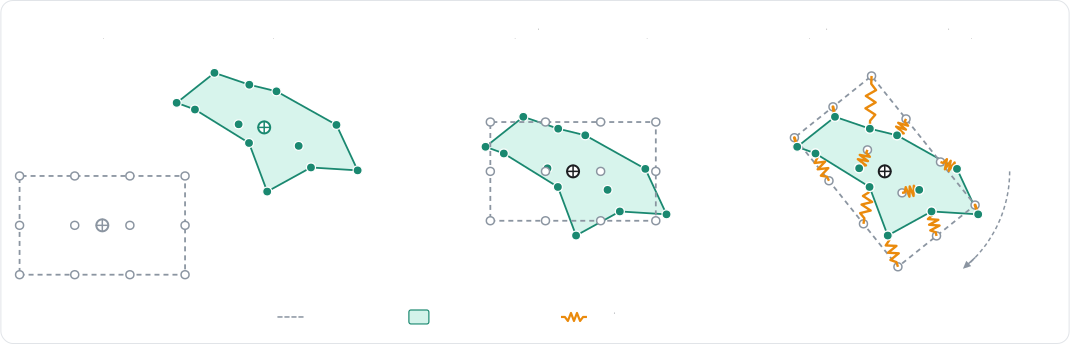
Once the matched pose is found and applied to the undeformed soft-body so it aligns roughly with the current deformed version, a virtual spring is inserted between each deformed point and its undeformed twin. The constraints solver then calculates the spring forces on each deformed point individually, making it eventually recover its undeformed shape. As you can see, each point is considered individually, there is no constraint between two mass points of the same deformed soft-body.
Use shape-matching for low-detail or degenerate deformations, or for situations where calculating a topology (edges, cells, etc.) is not desired. Shape-matching performs very poorly for ropes, cloth, or any highly deformable non-closed shapes.
Spring constraints
Main reference: A Constraint-based Formulation of Stable Neo-Hookean Materials (Macklin & Müller)
Constraints-based deformations are likely the most common and versatile approach. It offers a good compromise between realism and performance. Its main limitation compared to FEM is that the apparent stiffness of the soft-body is dependent on the constraints solver convergence: low iteration count results in softer material even at high stiffness coefficient.
Spring constraints work with both edges and cells. For edges, springs are modeled as a simple spring-damper system. For cells, they can either use a constraints-based Neo-Hookean or Corotated linear elastic model (which you can interpret as Hooke’s law but on a volumetric element instead of a segment), or a volume constraint (the deformed cell aims to match the rest volume).
Finite Elements Method (FEM)
Main reference: Large steps in cloth simulation
The FEM solver offers the most realism but is also significantly more computationally expensive. It will resolve
deformations semi-implicitly, making it capable of simulating very stiff materials. The FEM solver requires cells to
operate, meaning that you need some sort of triangulation (in 2D) or tetrahedrization (in 3D) of your model.
Rapier provides some triangulation and tetrahedrization functions through SoftBodyBuilder::volumetric, which fills
a closed boundary mesh with cells:
- In 2D, the interior of the boundary polyline is triangulated with Delaunay and refinement to insert internal mass points.
- In 3D, the shape is enclosed with tetrahedrons using the Isosurface Stuffing (Labelle & Shewchuk) method.
Use FEM for stiffer materials where you want its simulated stiffness to be independent of the solver iteration count. This also results in more realistic plasticity and failures (tearing).
Handling penetrations and self-intersections
Because deformable bodies will almost always end up having a non-convex shape, collision-detection and collision resolution immediately become an order of magnitude more difficult than with rigid-bodies. In fact, game physics engines generally try very hard to avoid non-convex colliders for dynamic rigid-bodies; this is why you will almost always see concave shapes approximated with convex primitives using Compound Shapes or (Approximate) Convex Decomposition. Some physics engines entirely forbid using meshes as the collision shapes for dynamic rigid-bodies.
But why do physics engines try to avoid non-convex colliders on dynamic bodies so much? Two main reasons:
- Performance: for example detecting collisions between two cubes through the SAT algorithm is much cheaper than colliding their 12-triangle mesh representations.
- Collision response: because meshes (polylines in 2D) do not have an explicit representation of their interiors, they are generally seen as triangle soups. And each triangle/triangle collision is seen individually. So if two meshes (or polylines) are penetrating, some contacts will actually actively try to keep them in this penetration state instead of resolving the penetration.
The performance issue isn’t a huge deal: as long as the game developer is aware of the cost, they can decide on when and how soft-bodies are relevant to their gameplay. The collision response issue on the other hand is out of the game developer’s hands since this is core physics engine behavior.
And of course, deformations make it even worse: not only can two meshes penetrate, but a single mesh can also deform and intersect itself, getting tangled with itself:
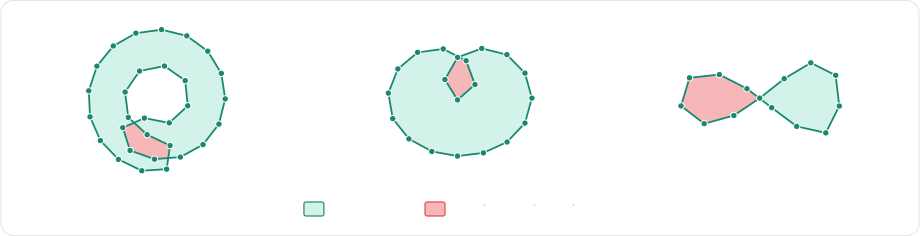
The mesh/mesh intersection and self-intersection problems are not new. While the collision-detection itself is a somewhat well-solved problem (as long as we keep it feature-local), the modeling and resolution of the contacts is a very difficult problem for physics simulation, resulting in decades of still-ongoing research. Here are the main families of approaches we identified from the literature:
- Guarantee no penetrations/self-intersections: the idea is that if you can guarantee that the physics solver behaves in such a way that two meshes never penetrate or self-intersect no matter how hard you push on them or how folded they are, then you completely eliminate the penetration/self-intersection problem. This is arguably the most true-to-reality approach, but it comes at a heavy cost from the constraint solver. This generally involves mesh CCD (Continuous Collision Detection), barrier potentials (contact models that get infinitely strong as the distance gets close to zero), and an implicit solver iterated to convergence to satisfy the constraints. IPC and ABD are two major publications in that domain. Methods falling in that category often leverage the GPU to achieve interactive rates.
- Let penetrations happen, and use global analysis to fix them. Since a simple triangle/triangle local collision response cannot work, the idea is to identify patches of penetrating mesh elements that need to be pushed globally. We recommend the paper Untangling Cloth (Baraff, et al.).
- Consider penetrations as a normal occurrence and rely on the intersection volume for the contact model. We are thinking in particular of the paper Volume Contact Constraints at Arbitrary Resolution (Allard, et al.). The idea is to let the shapes penetrate and define a contact model that pushes the deformable objects in the direction opposite to the volume gradient (i.e. push them to minimize the volume overlap). This has the benefit of being independent of the actual triangle/triangle contact points/normals that are at the core of our collision-resolution issues.
For Rapier, we experimented with (2) and (3) as they both felt reasonable performance-wise on paper. (1) felt clearly out of our performance budget.
The approach (2) was reasonably good, but can suffer from occasional glitches due to floating-point inaccuracies during the global search/flooding. This can occasionally result in a suddenly incorrect movement when the simulation would otherwise remain peaceful. But we do think that (2) has good potential and might revisit it later (and encourage other engine writers to consider it so we can figure out how to make it work more robustly and efficiently).
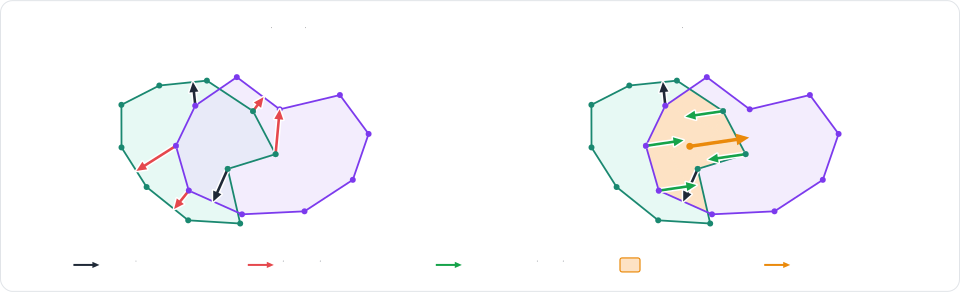
The approach (3) was very promising as soon as we tried it. While we did not end up keeping an implementation that matches everything from the paper, our solution can be seen as a dumbed-down variant of that paper. It boils down to one observation: the "volume normal" obtained from the volume gradient (which the paper uses for defining the friction plane) turns out to be a fairly good approximation of the MTV (Minimum Translation Vector) direction.
In rigid-body physics, the MTV is essentially the smallest direction and distance you need to push your object towards to fix
penetration. In a purely mathematical sense, this is the smallest distance between the origin and the boundary of the
Minkowski Difference of the two shapes. This is "easy" to find for
pairs of convex objects since their Minkowski Difference can be cheaply defined implicitly through the subtraction of
their respective support mappings (the SupportMap trait in Rapier/Parry). It is however extremely difficult and
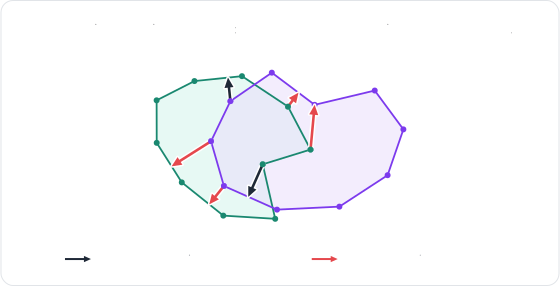
computationally expensive to calculate on arbitrary non-convex shapes. The schematic below shows the difference between
local depenetration vectors (red) and the actual global MTV (blue) for a non-convex intersection.

Obtaining a good approximation of the MTV between two deformable meshes is very valuable, even if we don’t necessarily know its magnitude. This allows us to push the shapes toward that direction until they de-penetrate. And since we consider that direction as the "blessed" depenetration direction, we can use it to filter-out/fix incorrect local triangle/triangle contact directions that would otherwise make the pair of meshes stay in a penetrating/tangled configuration.
The concept of soft frames for joints and colliders
Physics engines often limit the types of joints you can attach to soft-bodies, and the API for doing so is usually
separate from the main rigid-body API. In Rapier, we introduce the concept of soft frames to solve this rather
elegantly. A soft frame is a coordinate system (translation + rotation) associated to a piece of a soft-body.
That coordinate system is represented as a RigidBody with a special RigidBodyType::SoftFrame type (recall that
until now Rapier supported the RigidBodyType::Dynamic, ::Fixed, ::KinematicPositionBased and ::KinematicVelocityBased
types. So ::SoftFrame is just an additional variant to that enum). This is useful for two reasons:
- Joints and non-deformable colliders need both a translation and a rotation to work. This is precisely what rigid-bodies provide.
- By representing soft-frames as regular rigid-bodies, all the pre-existing APIs work the same: if you want to attach a joint to a soft-body, just attach it to one of its soft-frames. Same for colliders. You define and manipulate them exactly the same way as you would with a regular rigid-body.
Essentially, the concept of soft-frame is to associate, and automatically update, a single translation and rotation to a soft-body. That single translation and rotation should hopefully behave continuously through time and should be representative of its location/orientation if it weren’t deformed. We already discussed a concept we can reuse precisely for that: shape-matching!
So, in essence, a RigidBody of type SoftFrame is a special type of RigidBody which has its translation
and rotation automatically calculated with shape-matching on its associated soft-body at each step.
When a SoftBody is created, Rapier automatically creates a companion RigidBody with type SoftFrame. That
companion RigidBody (that we also call a "proxy") has a RigidBodyHandle that you can use for attaching
impulse joints and rigid colliders to it, just like you would with any other rigid-body.
The existence of that rigid-body proxy is actually very convenient for other internal reasons. In Rapier, a lot of the existing logic, like the handling of islands, the narrow-phase, etc., is built around rigid-bodies and colliders. So relying on a rigid-body proxy and colliders attached to it avoids adding complexity (and potential bugs or performance regressions) to this internal plumbing.
But that single soft-frame is often not expressive enough. If you want to attach two (or more) joints to a soft-body, or if you want the joint’s effect to be concentrated at a particular location other than around the center of mass, the whole-body soft-frame will not be enough.
This is why a soft-body can have multiple soft-frames associated to it. Each soft-frame can be associated to any subset of the soft-body’s mass points and the resulting shape-matching for translation and rotation calculations will be local to that subset of points. This allows joints to be attached to smaller clusters of mass points independently, each with their own independent orientation.
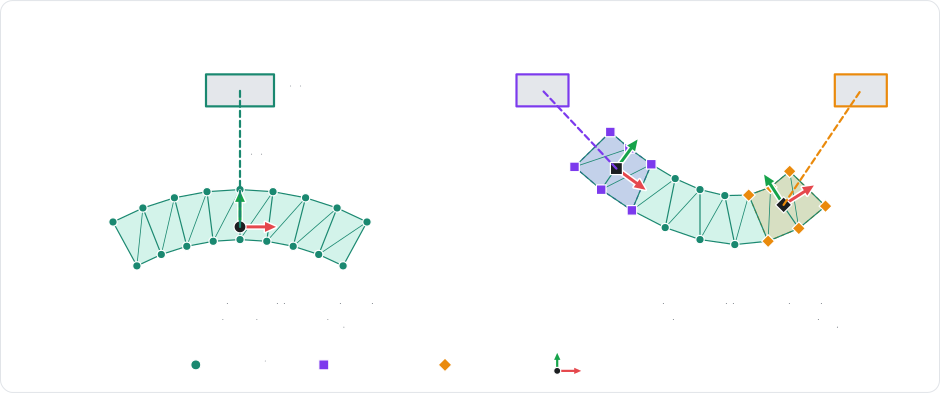
Therefore, Rapier allows you to create clusters on soft-bodies, each with an associated SoftFrame. Each of these
is a RigidBody with positions and rotations synced automatically from the shape-matching on subsets of the soft-body
mass points. Thus, you can also attach non-deformable colliders to them, meaning that two rigid-colliders attached to
the same soft-body but through different soft-frames will move and orient themselves independently.
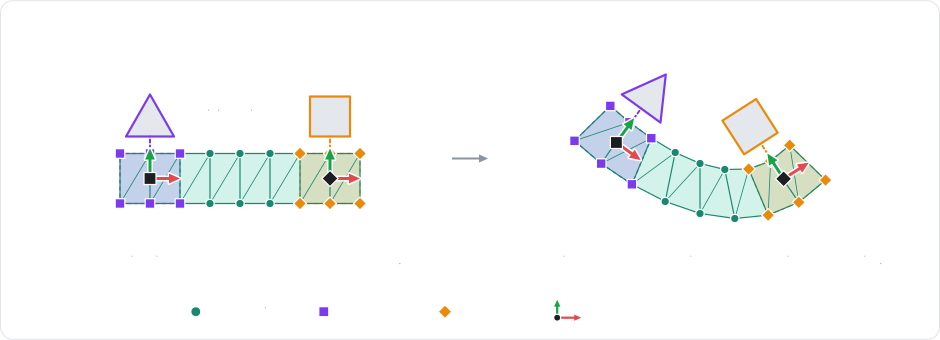
If no rotation can be calculated from shape-matching (for example if the soft-frame only covers one or two mass points), then joints attached to it will see their angular parts fully disabled.
Cage simulation and skinning
Unlike engineering, games don’t worry too much about mechanical correctness. Instead, they want the simulations to look good, stable, and to run fast. As a result, it is not uncommon for the simulation shapes to be significantly simpler than the visual shapes: meshes are approximated with coarser meshes or even with primitives, some details are ignored, etc. The same holds for soft-bodies: handling every single visual triangle as its own soft cell is often unnecessary and will often impact performance and even robustness badly (too large number of elements and/or badly shaped elements). This is why Rapier supports cage simulation and skinning.
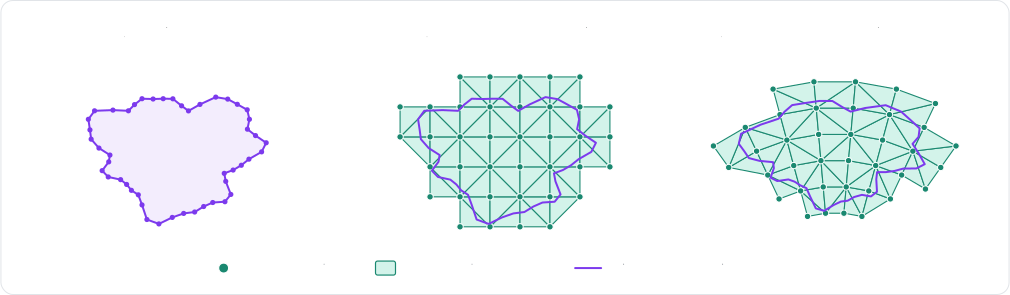
Cage simulation means that your detailed deformable mesh (collision and/or visual) is trapped into a deformable "cage". That cage is a volumetric blob that often has a larger volume than the original mesh. Similarly, a deformable sheet would be modeled as a thicker set of deformable tetrahedrons (or triangles in 2D). That "cage" generally has a much lower geometric precision than the visual mesh, and has the benefit of being well-formed (e.g. regular tetrahedrons) and volumetric. The vertex positions of that detailed mesh are interpolated from the deformed cage: this is skinning. Note that you don’t need a volumetric cage for leveraging skinning: it would also work with any deformable mesh associated to your visual mesh.
Rapier is capable of automatically calculating a cage for simulating any deformable mesh with
SoftBodyBuilder::volumetric_skinned. In 3D, it is built using the
Isosurface Stuffing algorithm, skipping the snapping step so that the input mesh
remains fully enclosed. That automatic calculation is focused on performance rather than geometric fidelity.
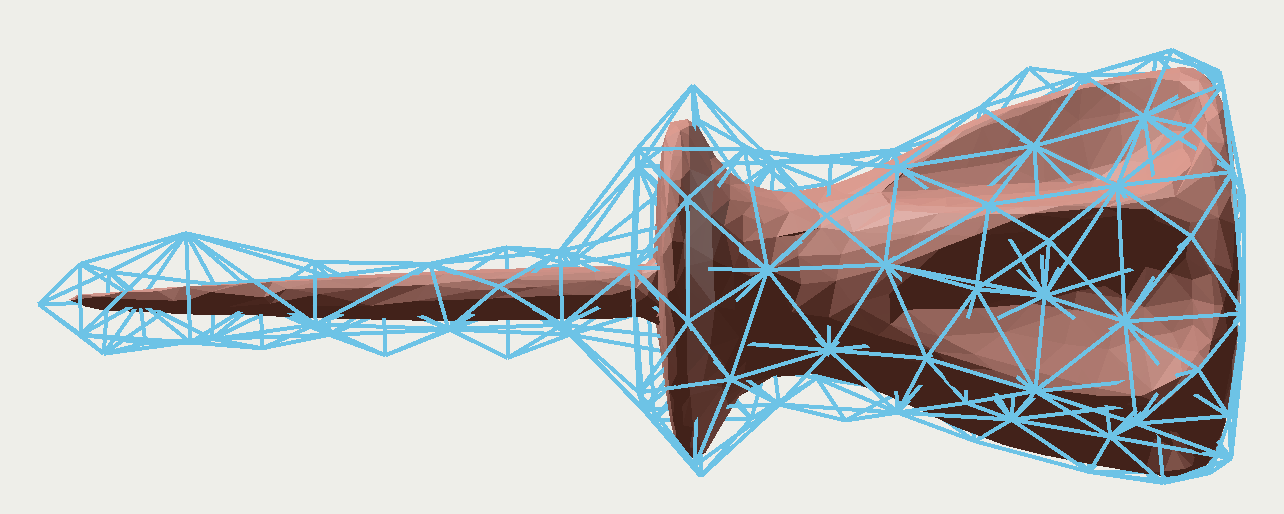
A detailed screwdriver mesh and its automatically generated coarse deformation cage (blue)
The paper Skeleton based tetrahedralization of surface meshes is how we learned about the existence of cage simulation (but we didn’t end up implementing that paper’s skeleton-based technique).
Permanent deformations: tearing and plasticity
Main reference: Interactive virtual materials (Müller & Gross)
Finally, two interesting features of soft-bodies are the ability to model permanent deformations. We distinguish two concepts:
- Plasticity: permanent change of rest position of the mass points (without any topology change). This models materials like a piece of metal that folds on impact, clay being molded, etc.
- Tearing (aka. "failure/fracture"): permanent change of the soft-body topology where pieces of it physically disconnect from other pieces. This models effects like breaking glass, a piece of fabric being torn in two, etc. Tearing is implemented with a mass-splitting approach. Instead of removing elements (edges or cells) when they are torn, we split their mass points in two. That way, the volume of the post-split shape matches the volume before the split. Each connected component after the split becomes its own independent soft-body.
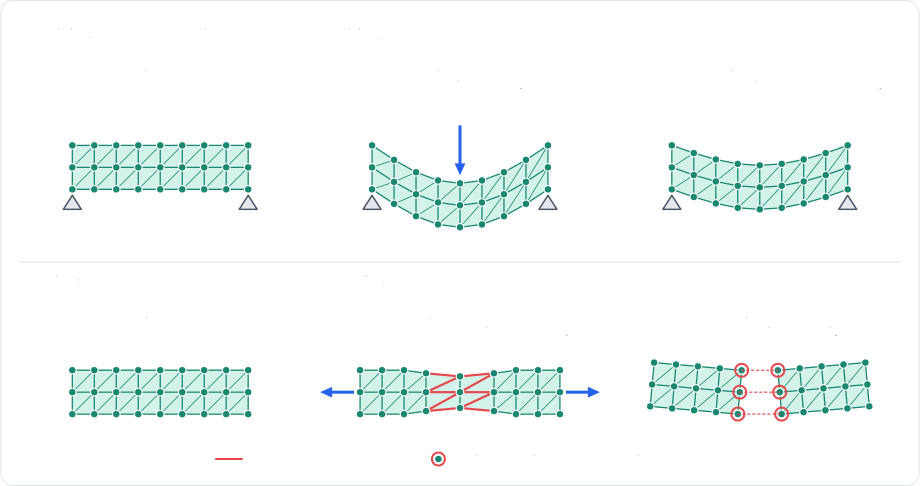
Rapier supports tearing and plasticity with both solver types (SoftBodySolver::Fem and ::Constraints). When
using the constraints-based solver, the quality of plastic deformations is strongly correlated to the solver’s
convergence, meaning that more solver iterations result in more convincing permanent deformations.
Where can I use Rapier’s soft-bodies today?
Soft-bodies are available starting with Rapier 0.36.0. They can currently be used from:
- Rust: using the rapier crates directly: rapier2d and rapier3d, user guide.
- Typescript: using our official Typescript bindings, available on NPM: @dimforge/rapier2d and @dimforge/rapier3d, user guide.
- Python: using our official Python bindings, available on PyPI (3D only): rapier3d, user guide.
- C: using our (new 🎉) official C bindings: sources, user guide.
- Bevy: with
bevy_rapierfor integration with the Bevy game engine: sources, user guide.
Our updated Bevy plugin bevy_rapier is not published yet because it currently depends on a more recent, unreleased,
commit of the Bevy main branch. This is temporary until the next Bevy release. This is a necessary limitation because
Bevy 0.19.1 still depends on an outdated version of glam. It will be fixed with Bevy 0.20.0.
Support in Godot will likely be added once the third-party godot-rapier plugin gets updated.
The new C bindings will allow easier integration of Rapier into other popular game engines (Unity, Unreal, etc.) in the future.
Acknowledgements
We cannot thank enough:
- Futurewei for sponsoring our physics work for robotics and AI.
- NGI Zero Commons Fund for accepting our grant proposal to further extend the solvers supported by our GPU physics engine Nexus.
- The maintainers of all the fantastic libraries we build on top of.


Thanks to all the former, current and new sponsors! This helps us tremendously to sustain our Free and Open-Source work. Finally, a huge thanks to the whole community and contributors!
** Credit: the car model from the "Plastic car chassis (3D)" demo video is Dune Hunter (taanX).
Help us sustain our open-source work by sponsoring us on GitHub sponsors or by reaching out ♥
Join us on discord!