Dimforge Q3 2026 technical report − Nexus multiphysics, Rapier soft-bodies, performances, and bindings

This article summarizes the most significant additions made during the third quarter of 2026 to our open-source crates we develop for the Rust community.
If you haven’t seen them already please check out our Q1 technical report and Q2 technical report. For this third quarter we made significant improvements on both features and performances for our new Nexus cross-platform GPU physics engine as well as our CPU-based rigid-body physics engine Rapier.
Some of the work presented in this post has been cooking longer than the past three months, but have been released within the past three months.
Nexus: cross-platform GPU physics

Nexus is our new cross-platform GPU multiphysics engine that we introduced in July 2026. All its GPU shaders are written purely in Rust, and compiled with rust-gpu, rust-cuda, or cuda-oxide. It supports most major platforms through Metal, WebGPU, or CUDA, and runs on the web too (except Safari).
Nexus is cross-platform and even works on the web if your browser supports WebGPU (but not in Safari). Check out our online demos: https://nexus.dimforge.com/demos
Significant performance improvements
With the release v0.7.0, the performances of Nexus have been significantly improved, especially for rigid-body simulations, bringing it on par (and occasionally faster) with similar engines like NVIDIA’s Isaac. We eliminated bottlenecks that hurt performance scaling when simulating hundreds of thousands of rigid-bodies, and improved the memory layouts and access patterns on the solver in general to fit an AoSoA (Array of Struct of Array) design somewhat similar to Rapier’s SIMD optimizations. We also implemented in Nexus the equivalent of Rapier’s "Twist-friction" model which is an approximation of frictional contacts that reduces the total number of friction constraints to solve compared to regular Coulomb friction, but without impacting the visual plausibility of the result.
With these performance improvements, we are able to simulate pyramids of rigid-bodies for a total of 505K bodies in real-time (about 14ms/frame) on an RTX 5080. And this is without any sleeping islands optimizations (which are not supported by Nexus yet). Currently, Nexus implements the same Soft-TGS solver as Rapier, and we are planning to add support for the (hopefully even faster) AVBD solver later this year.
You can compare the performances before and after the optimizations on your browser with the following links. Recall
that Safari is not supported. And note that, on Firefox, we recommend unchecking the Wait for render before stepping
option in the "Performance" tab of the demo UI. While keeping this checked makes the GPU timers more reliable by
preventing them from being polluted by parallel rendering workloads, it introduces a GPU/CPU synchronization step
that Firefox is very slow to resolve.
- After optimizations: https://nexus.dimforge.com/demos/
- Before optimizations: https://nexus.dimforge.com/demos-previous/
The Material Point Method
While we initially focused on rigid-body simulations with Nexus, we are beginning to add more solvers in order to simulate non-rigid materials. We are starting with the Material Point Method (MPM) since this is a solver we already implemented many times with the sparkl (CUDA) and wgsparkl (WGSL) projects.
MPM is a hybrid method, combining particles and a computational (invisible) grid. Currently, our MPM implementation works in 2D and 3D and supports an explicit solver (based on MPM-MLS) and implements models for elastic materials, sand, snow, liquids, and cutting if CPIC is enabled.
Nexus supports one-way coupling with rigid-bodies, meaning that rigid-bodies apply forces on MPM particles. We intend to add support for two-way coupling (meaning that MPM particles could also push rigid-bodies) later this year. The video below shows an elastic bunny (simulated with MPM) being grabbed and moved around by a robotic arm (made of rigid-bodies).
Unlike some other MPM implementations, ours comes with a sparse grid, meaning that it is very memory-efficient on larger scenes. Nexus also allows dynamic insertion (and removals) of particles and rigid-bodies at runtime.
Our MPM implementation is also compatible with web browsers. MPM demos can be selected in the "Examples" tab of the demos UI on https://nexus.dimforge.com/demos/ (you might have to scroll down on the demo list).
CUDA support with cuda-oxide
Thanks to Khal, we are able to write all the shader code once in Rust and have them run on most platforms by compiling the Rust code with rust-gpu while maintaining strong typing when calling shaders. Khal now supports a CUDA backend by automatically generating boilerplate for making the same rust-gpu-based code compilable with either rust-cuda or cuda-oxide (we currently support both, but will likely end up only supporting NVidia’s cuda-oxide once it supports building on Windows).
We significantly improved the CUDA support by implementing an automatic emulation of indirect kernel dispatches. Whenever you call a kernel through an indirect dispatch (which is valid with all the other GPU backends, but not supported by CUDA), the call is automatically converted to a loop (internal to the shader) that maximizes occupancy while not exceeding the index space defined by the on-GPU indirect dispatch counts.
For example, here is a simple shader, and the CUDA entry point that Khal automatically generates for it
when targeting cuda (here through cuda-oxide) and if it is called with an indirect dispatch. The while
loop iterates over the virtual workgroups read from the indirect dispatch counts __khal_indirect_args:
- Original shader
- Generated CUDA
#[spirv_bindgen]
#[spirv(compute(threads(64)))]
pub fn add_assign(
    #[spirv(global_invocation_id)] invocation_id: UVec3,
    #[spirv(storage_buffer, descriptor_set = 0, binding = 0)] a: &mut [f32],
    #[spirv(storage_buffer, descriptor_set = 0, binding = 1)] b: &[f32],
) {
    let thread_id = invocation_id.x as usize;
    if thread_id < a.len() && thread_id < b.len() {
        *a.at_mut(thread_id) += b.read(thread_id);
    }
}
#[cfg(all(feature = "cuda-oxide", not(target_arch = "spirv")))]
#[allow(non_snake_case)]
#[unsafe(no_mangle)]
pub fn cuda_oxide_codegen_v1_cuda_oxide_kernel_246e25db_add_assign_cuda_entry_1388f3a9454b3857(
    a: &mut [f32],
    b: &[f32],
    __khal_indirect_args: &[u32],
) {
    let __khal_tid = khal_std::arch::cuda::thread_idx();
    let __khal_block_dim = khal_std::arch::cuda::block_dim();
    let __khal_real_grid = khal_std::arch::cuda::num_workgroups();
    let __khal_num_wg: khal_std::glamx::UVec3 = match if __khal_indirect_args.len() >= 3 {
        Some([
            __khal_indirect_args[0],
            __khal_indirect_args[1],
            __khal_indirect_args[2],
        ])
    } else {
        None
    } {
        Some(a) => khal_std::glamx::UVec3::new(a[0], a[1], a[2]),
        None => __khal_real_grid,
    };
    let __khal_total = __khal_num_wg.x * __khal_num_wg.y * __khal_num_wg.z;
    let __khal_stride = __khal_real_grid.x * __khal_real_grid.y * __khal_real_grid.z;
    let __khal_bid = khal_std::arch::cuda::block_idx();
    let mut __khal_lin = __khal_bid.x
        + __khal_bid.y * __khal_real_grid.x
        + __khal_bid.z * __khal_real_grid.x * __khal_real_grid.y;
    let mut __khal_body = |__khal_wg: khal_std::glamx::UVec3| {
        let invocation_id = __khal_wg * __khal_block_dim + __khal_tid;
        {
            let thread_id = invocation_id.x as usize;
            if thread_id < a.len() && thread_id < b.len() {
                *a.at_mut(thread_id) += b.read(thread_id);
            }
        }
    };
    while __khal_lin < __khal_total {
        let __khal_wg = khal_std::glamx::UVec3::new(
            __khal_lin % __khal_num_wg.x,
            (__khal_lin / __khal_num_wg.x) % __khal_num_wg.y,
            __khal_lin / (__khal_num_wg.x * __khal_num_wg.y),
        );
        __khal_body(__khal_wg);
        __khal_lin += __khal_stride;
        if __khal_lin < __khal_total {
            khal_std::sync::workgroup_memory_barrier_with_group_sync();
        }
    }
}
Overall, on our RTX 5080 on Linux, running Nexus with the CUDA backend is about 10% faster than running it with the WebGPU backend.
Many thanks to Xavier Tao for contributing to the cuda-oxide support, including upstreaming many fixes on cuda-oxide itself so it can support our kernels.
Determinism and debug-rendering
Due to their chaotic nature, debugging physics engines is very difficult. To help with that, we added two essential elements to Nexus:
- Determinism: if you run the same scene twice on the same machine, you will get the exact same result. Note that this is not cross-platform determinism: results can still differ when running the same scenes on two different machines, especially if they rely on different GPU APIs (e.g. Metal vs. CUDA).
- Debug-rendering: when enabled, some wireframe lines will appear to help visualize bounding boxes, the BVH tree, contacts, the MPM grid, velocity fields, etc.
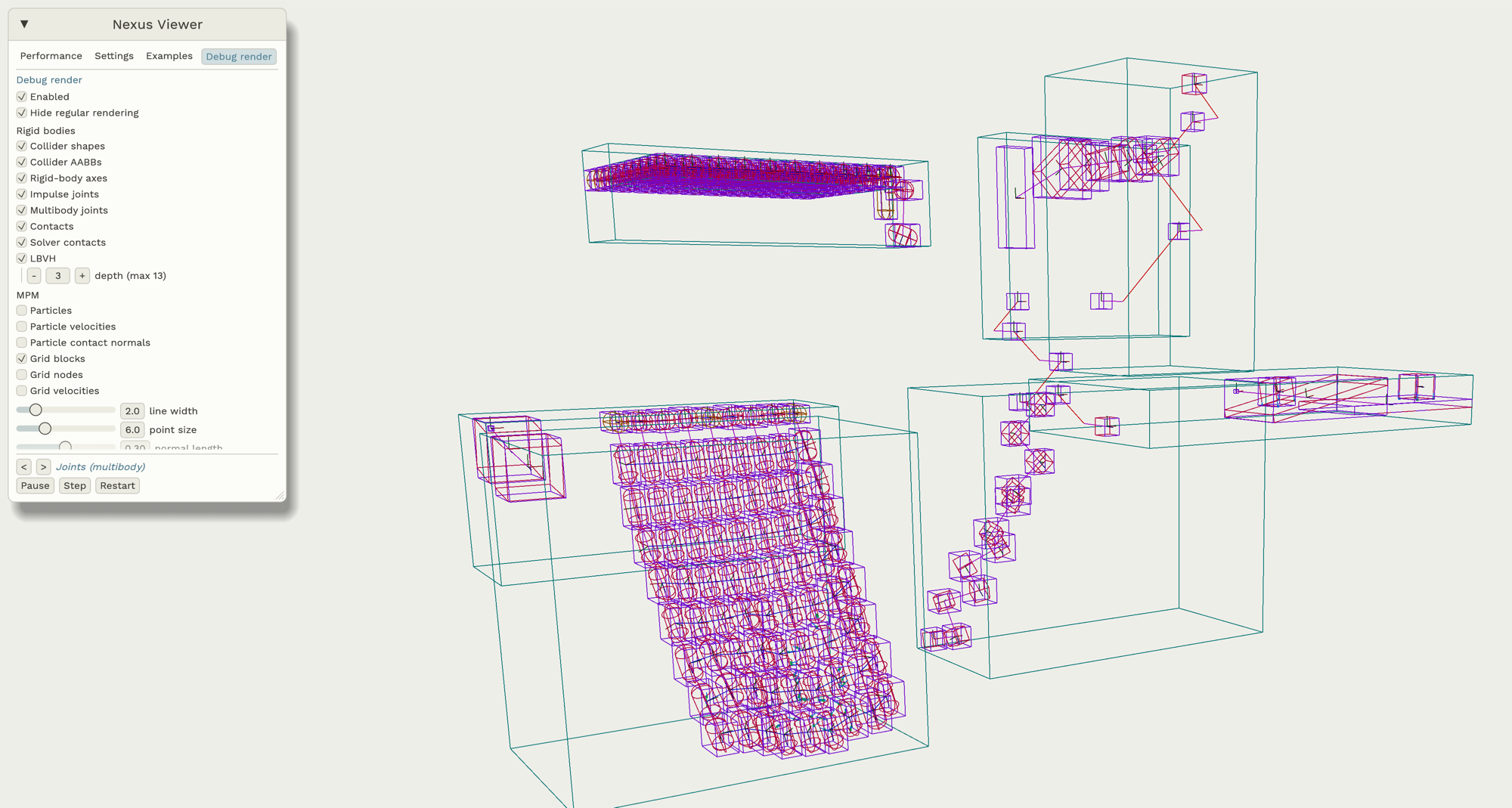
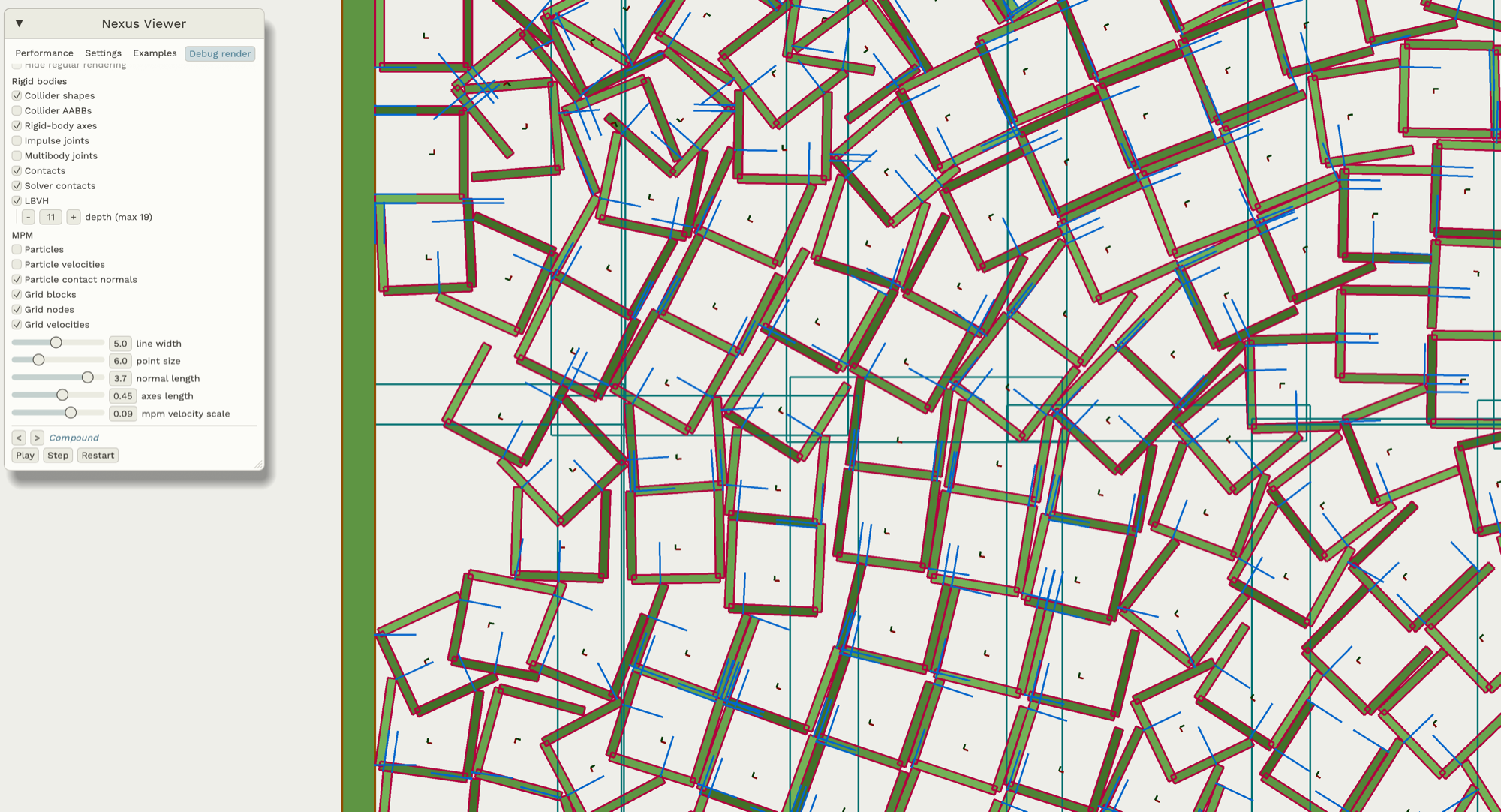
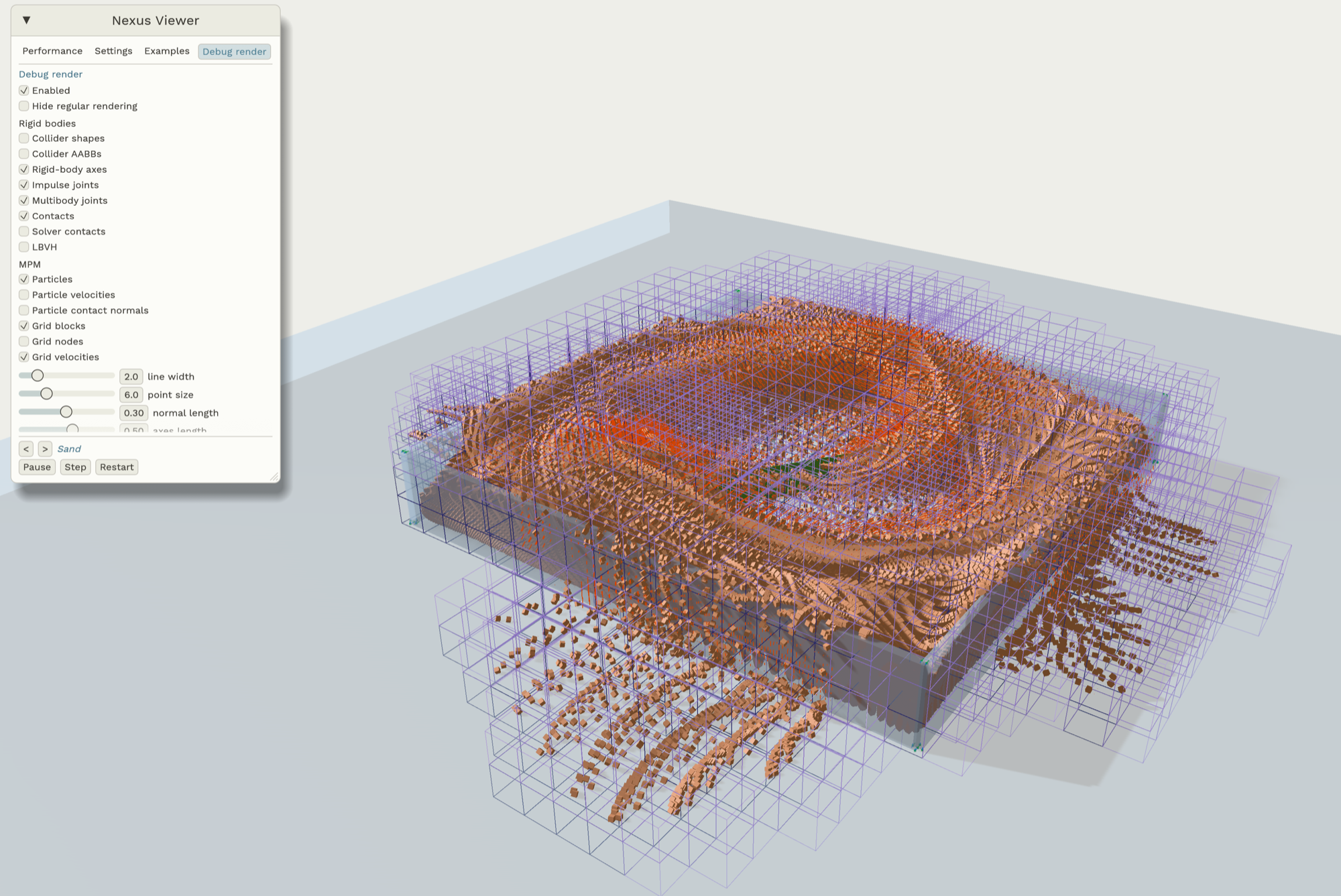
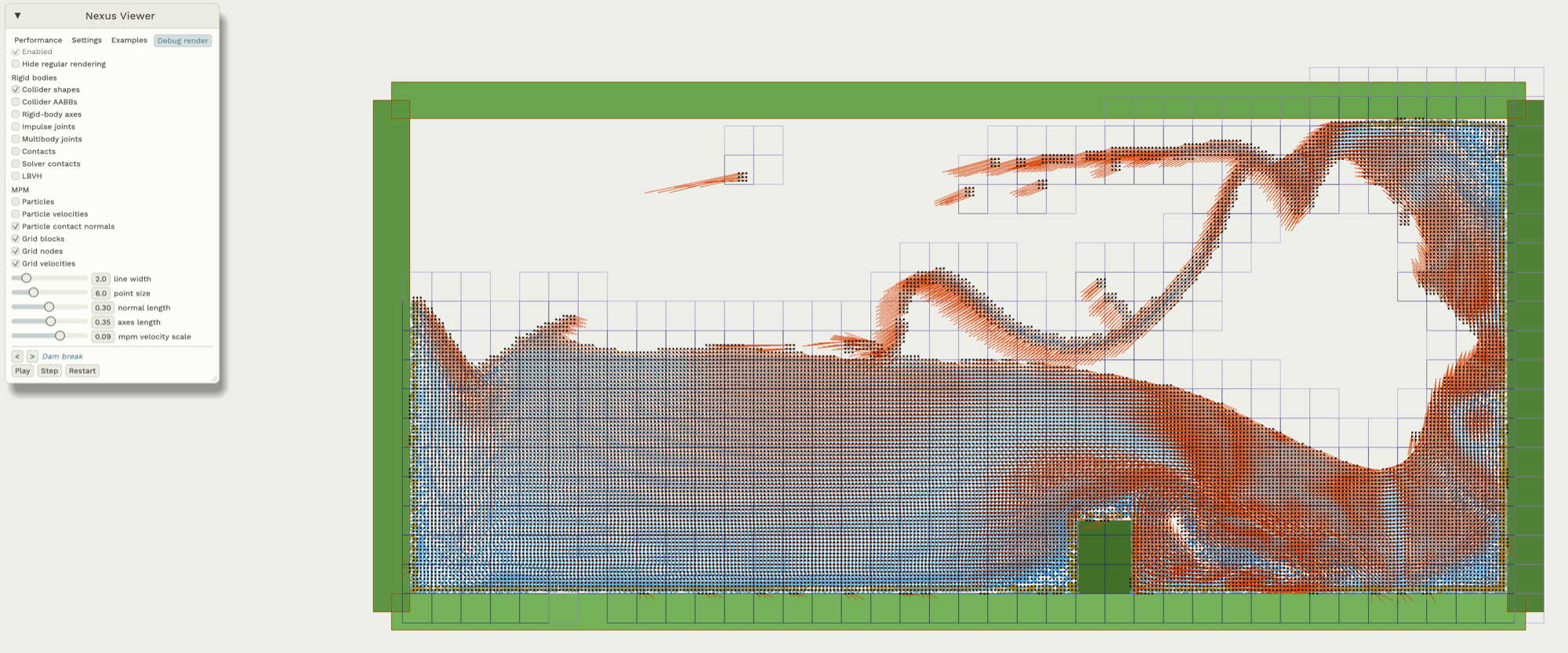
- Enabling the debug-renderer can have a significant impact on performances. Only enable it for debugging.
- Determinism can have about 10% negative performance impact on large rigid-body scenes, and no measurable impact on smaller scenes and on small-scene-multi-env scenarios (like robotics batch simulations).
Rapier: performances, soft-bodies, and bindings

During the past three months we have been focusing on both features and performances for Rapier. We completely reworked parallelism, added support for soft-bodies, and added bindings for more programming languages: C and Python.
Parallelism and performance improvements
While Rapier already supported a form of parallelism before, it was fairly inefficient and limited to solving separate islands (meaning, independent stacks of objects) in parallel. This has been completely reworked by implementing intra-island parallelism, persistent graph coloring, and parallelized broad-phase. You can check out the details (as well as performance comparison gaps) on the pull-request.
Note that the performance graphs from that PR involve the version of the physics engines at that time, early August 2026. The other physics engines like Box2D, Box3D, Jolt, and Avian might or might not have improved since then.
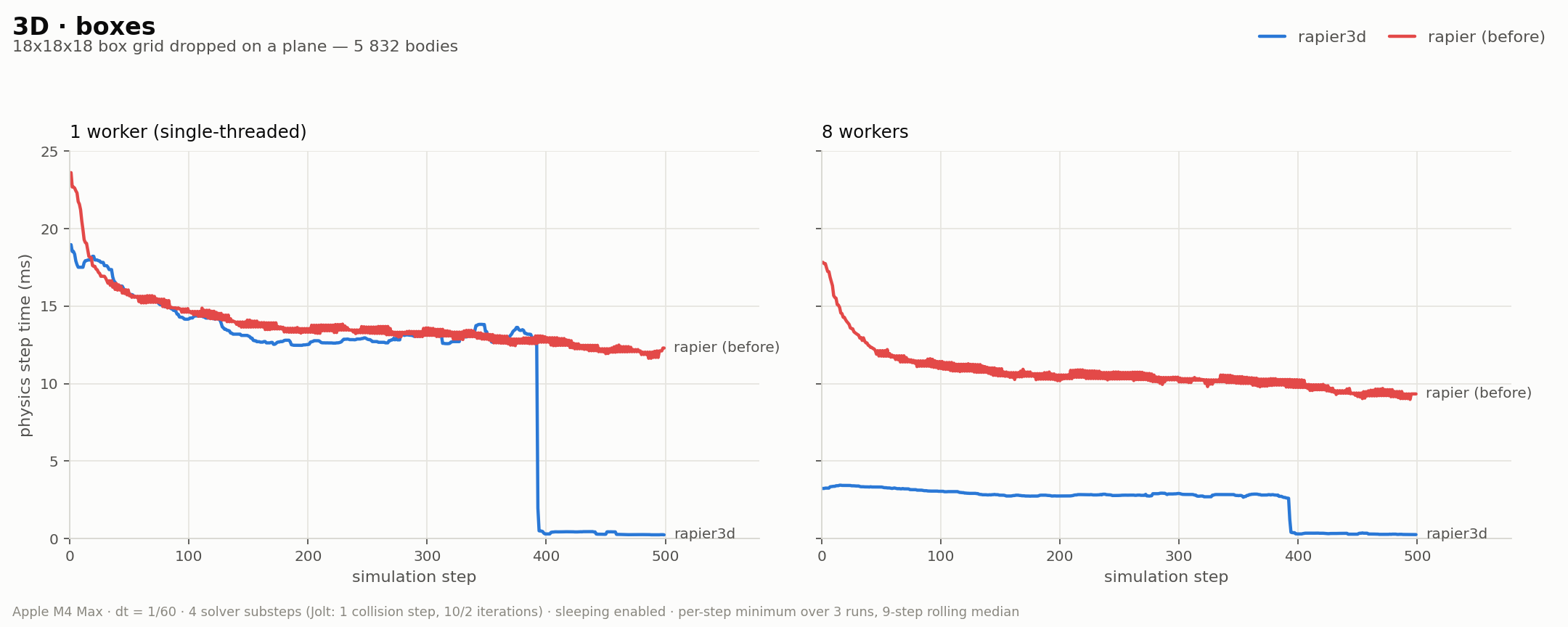
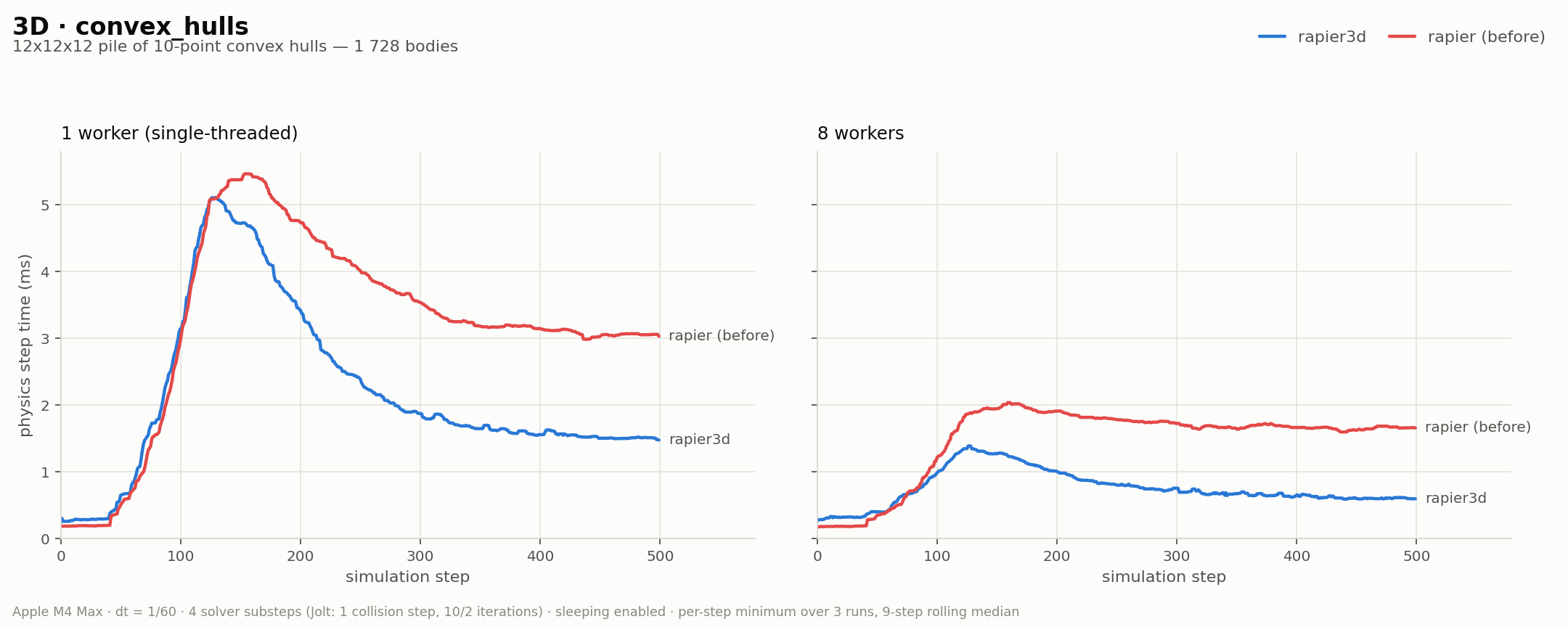
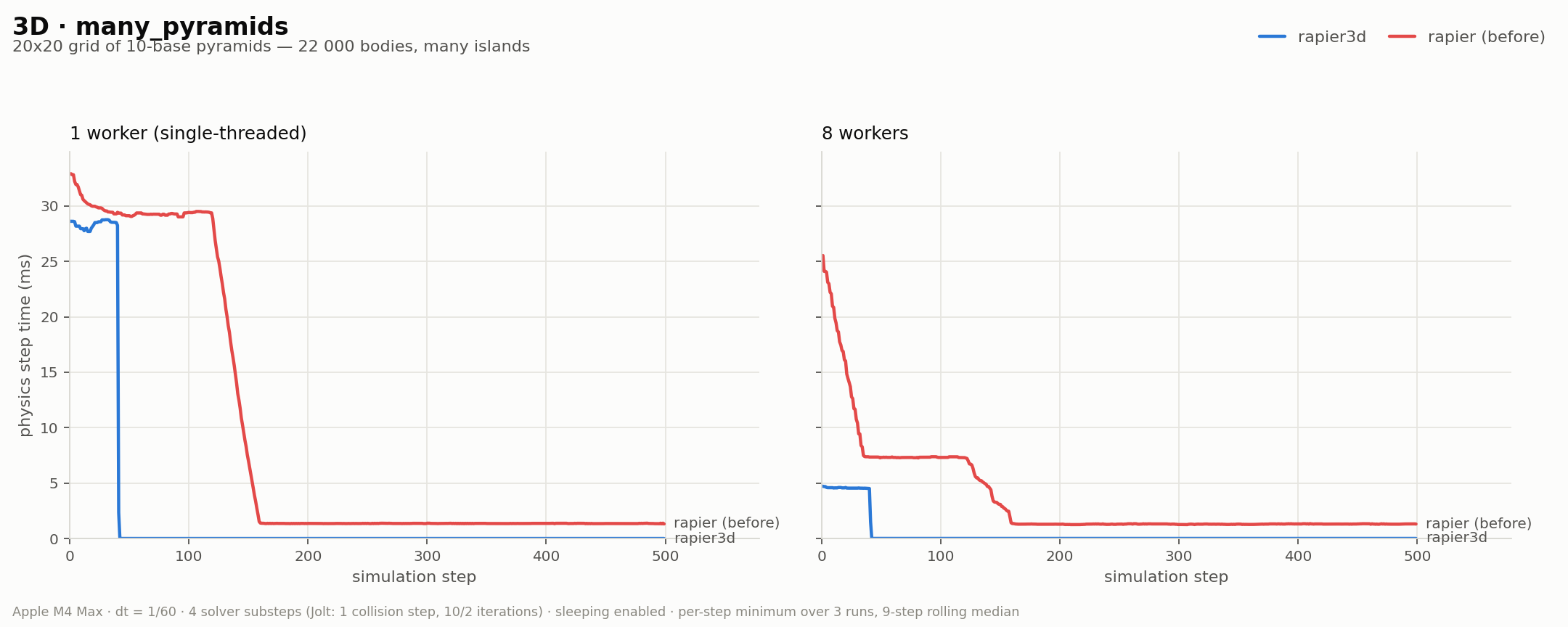
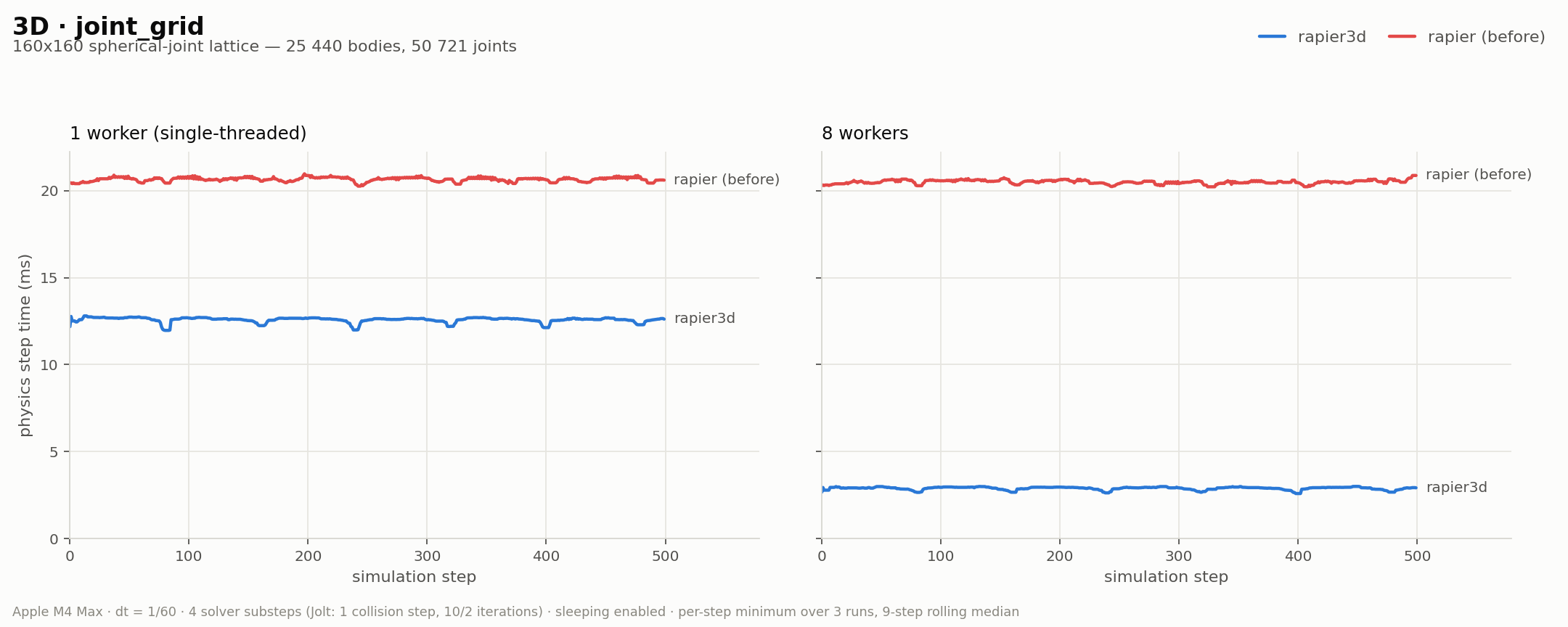
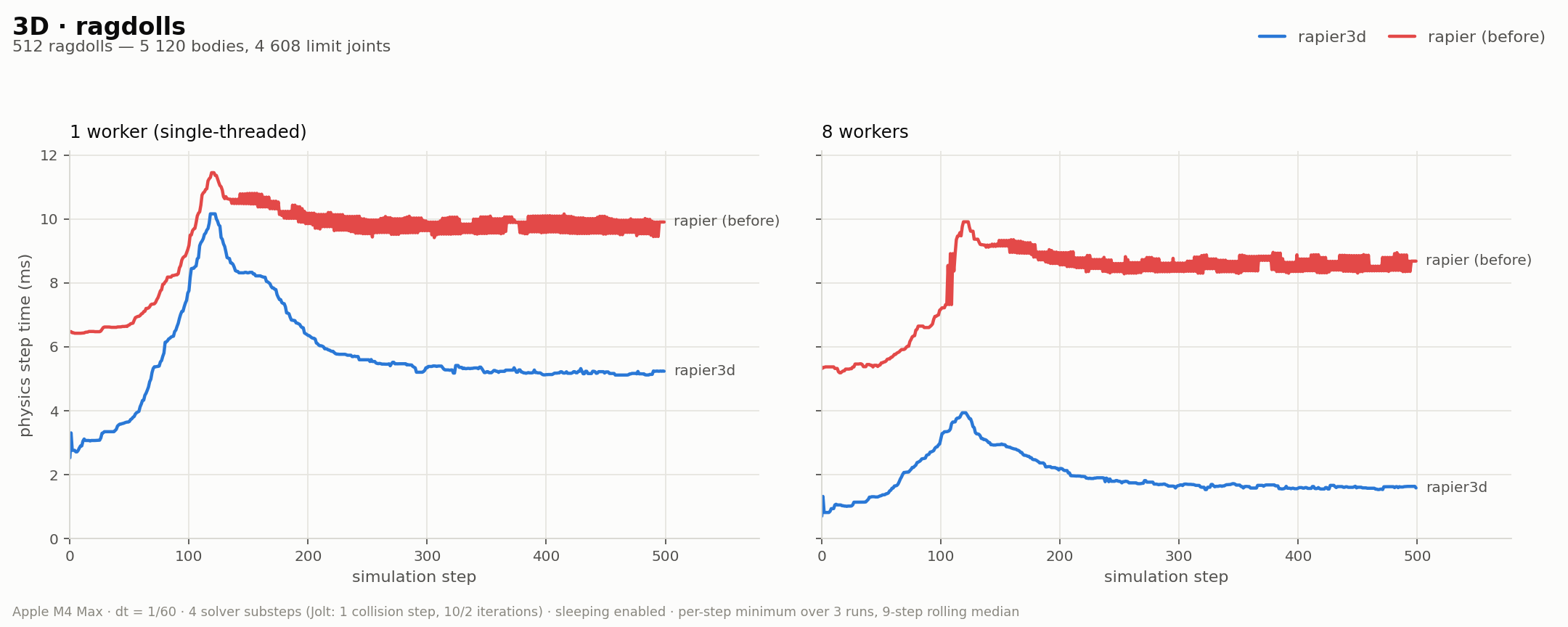
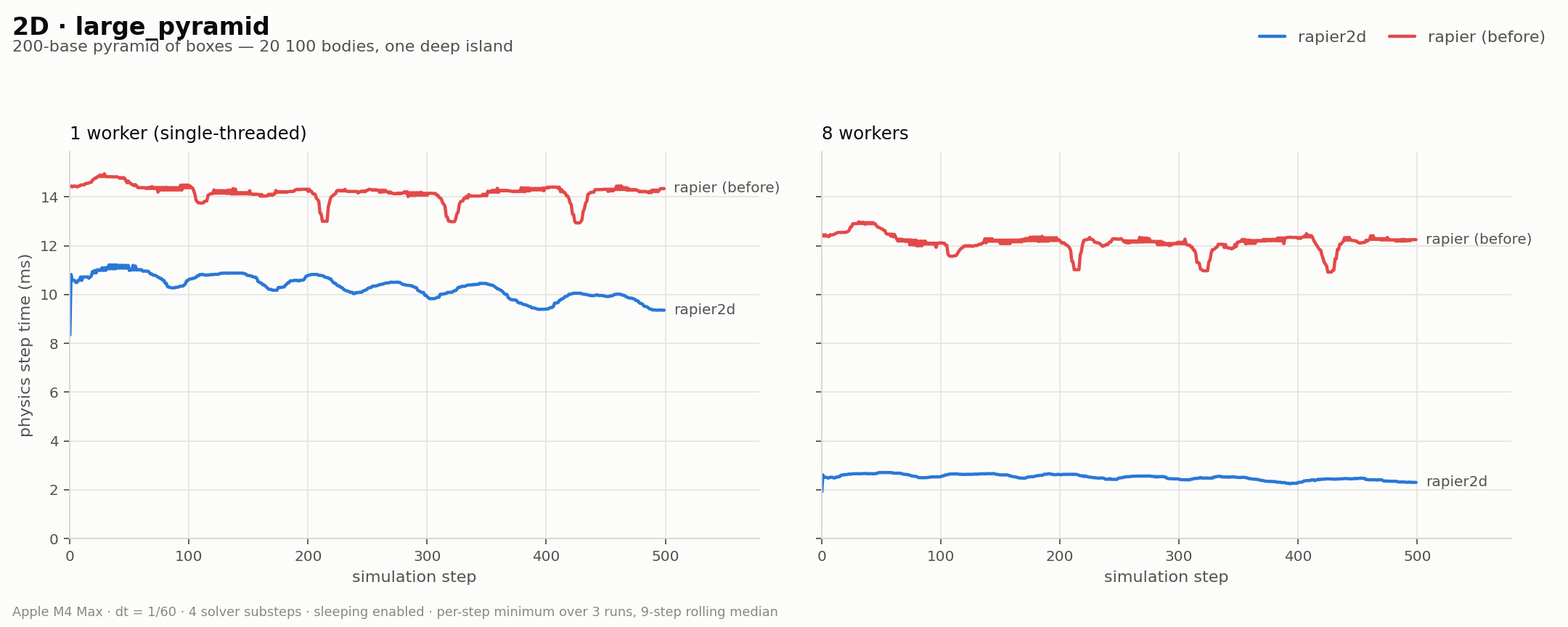
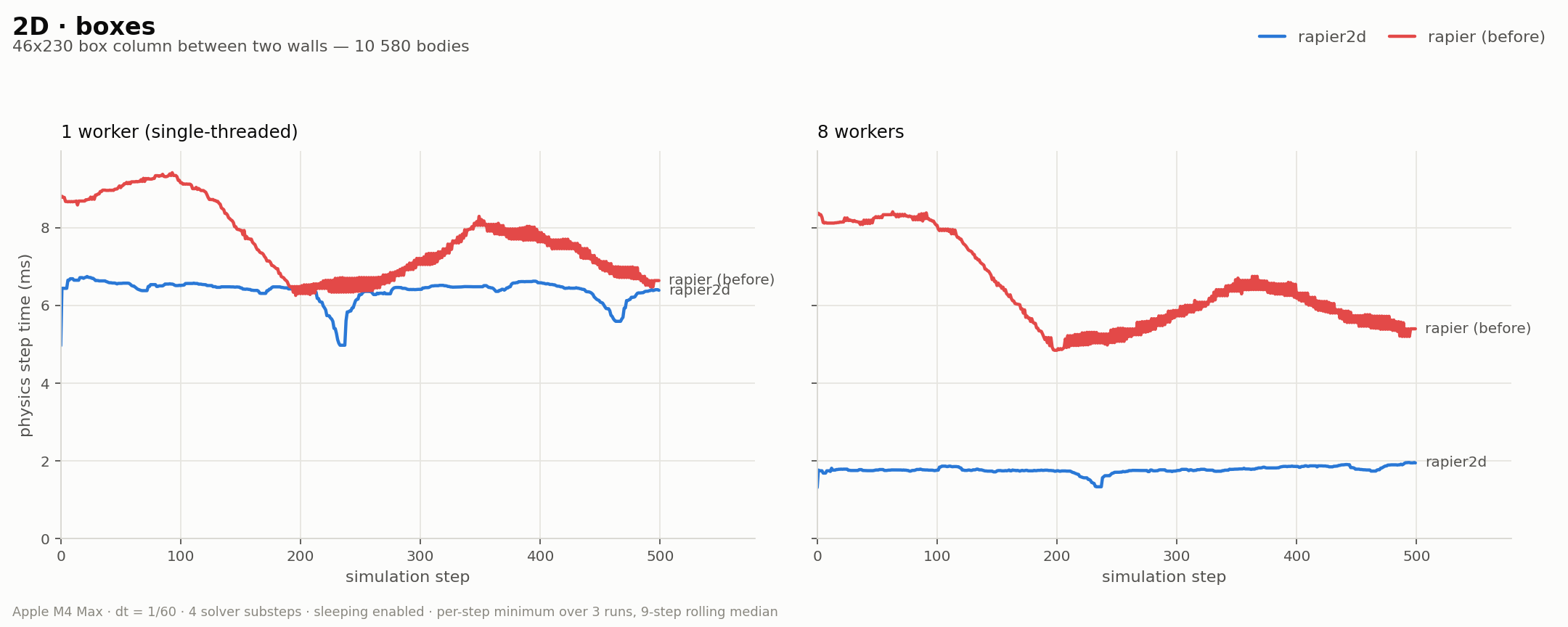
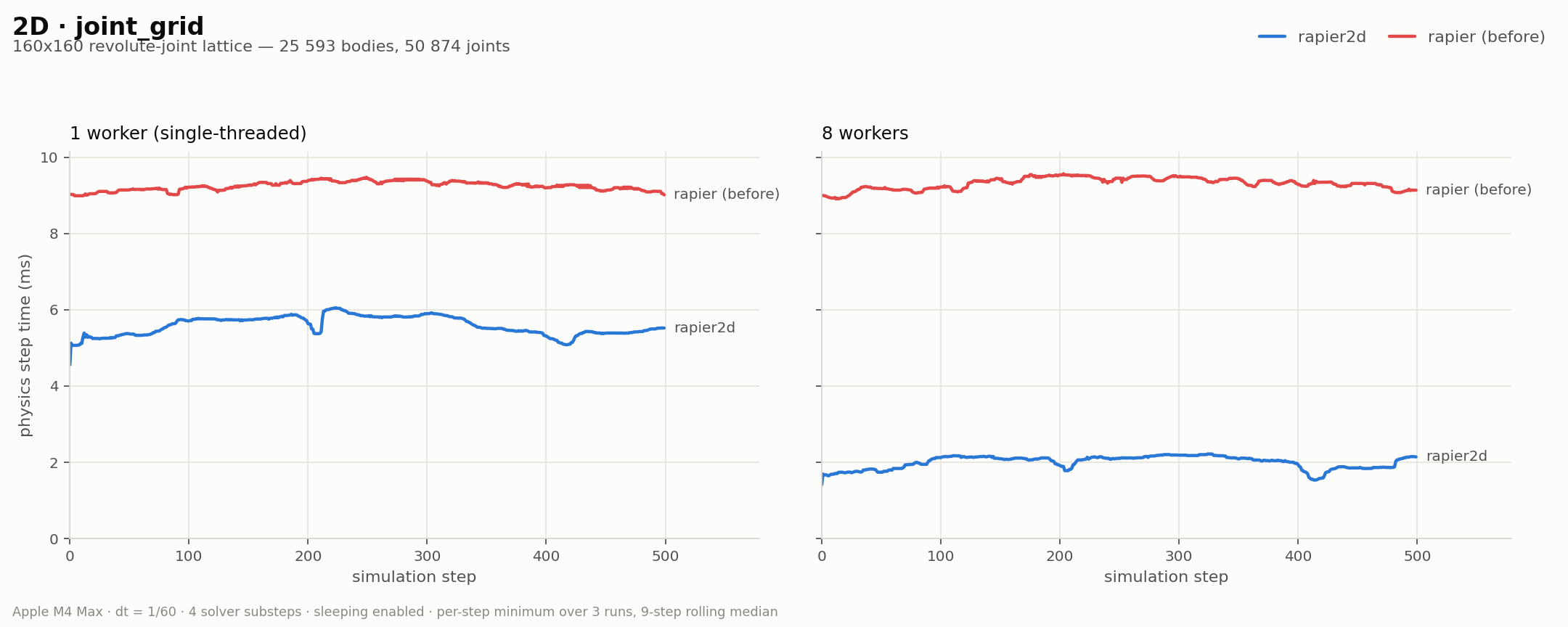
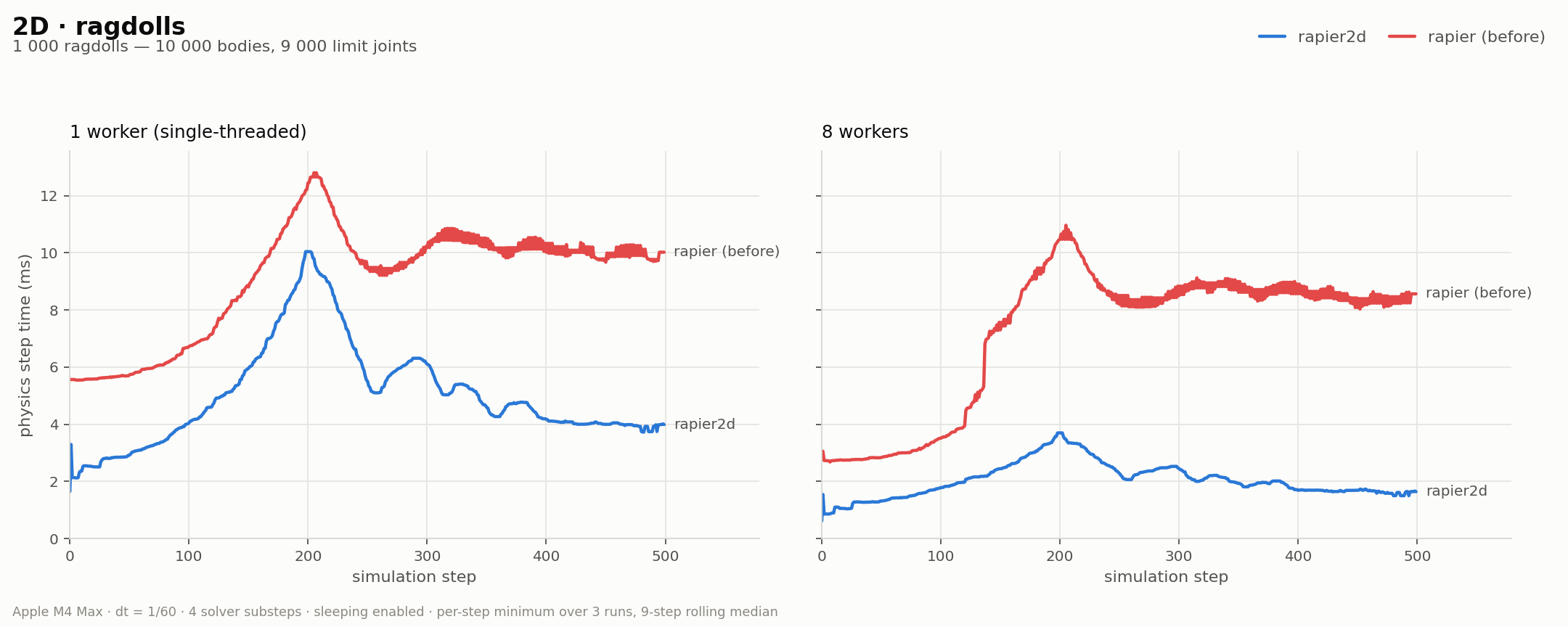
Overall, this makes Rapier up to 2x faster than before single-threaded, and up to 4x faster than before multi-threaded (measured on my M4 Max MacBook Pro with 8 worker threads). The graphs below compare Rapier before (red) and after (blue) the optimizations:
Advanced soft-bodies for games
We added to Rapier the support for deformable bodies including elasticity, plasticity (permanent deformations), and tearing. And we have put in place some methods to significantly lower risks of reaching degenerate configurations like two deformable bodies being tangled with each other.
Check out our dedicated blog post for details on this new feature, its capabilities, and the challenges we faced while implementing it.
Feel free to play around with the online demos of Rapier, which include scenes involving soft-bodies.
C and Python bindings
Another important addition is the (automated) creation of C bindings for Rapier. The goal is to make it easier to integrate it into other game engines (or non-Rust, non-JS, libraries and applications). They are available on the bindings/c directory on Rapier’s main repository. The C bindings come with examples and a testbed written in C, to give complete examples of how to use them:
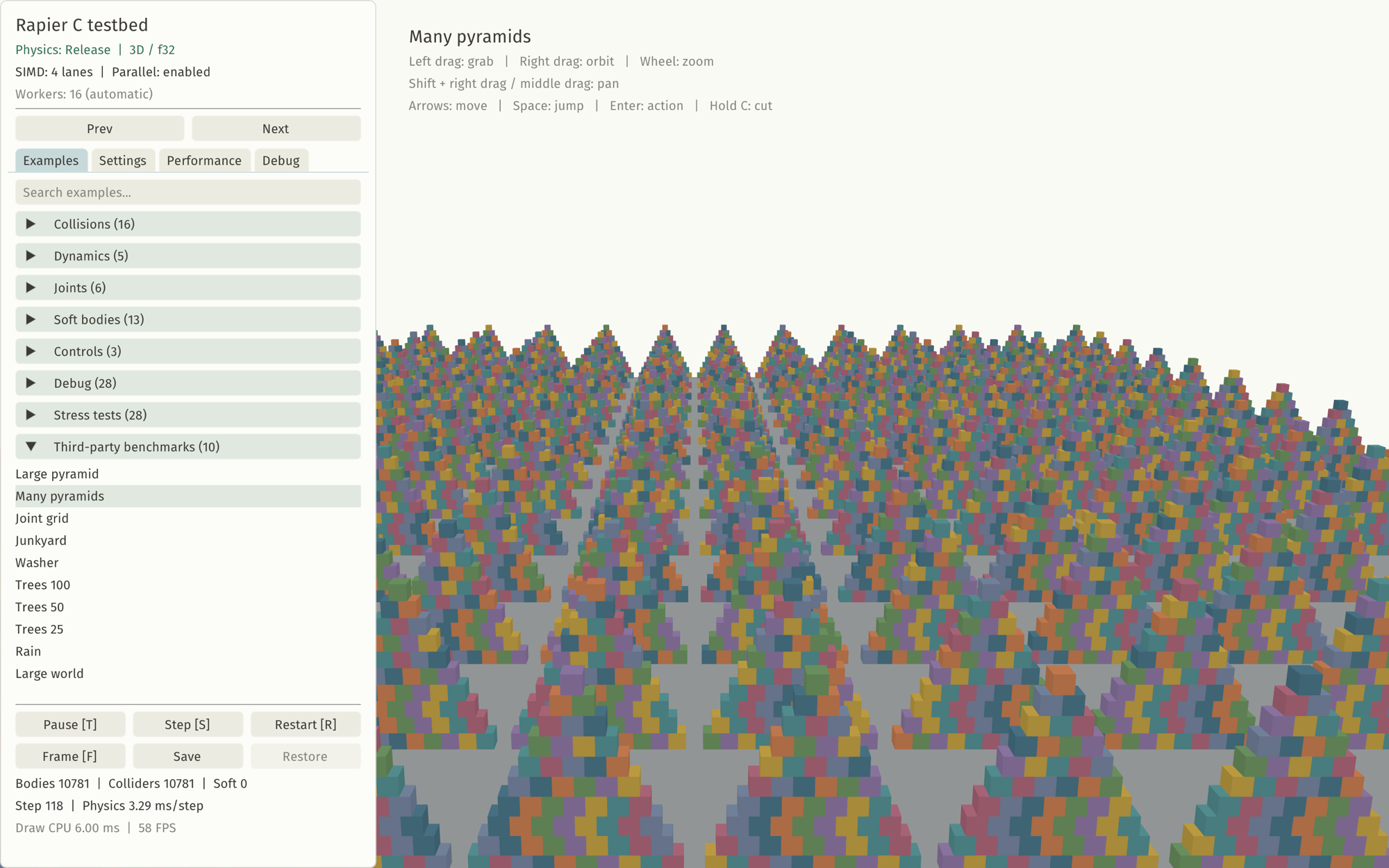
The 3D version of Rapier also has Python bindings available on bindings/python. The primary target for these bindings is the robotics community which still relies heavily on the Python ecosystem. These Python bindings are published to PyPI.
Here is the many pyramids example shown in the screenshot above, written with the C bindings (and using the C testbed) and with the Python bindings (without the testbed rendering):
- C
- Python
#include "testbed.h"
#include "rapier_helpers.h"
#include "rapier_math.h"

void tbManyPyramids(Testbed *testbed) {
    /* World. */
    R3World *world = r3NewWorld();

    r3SetGravity(world, r3Vector(0, -10, 0));
    R3RigidBodyDesc groundBody = r3FixedRigidBodyDesc();
    groundBody.position.translation = r3Vector(0, -1, 0);
    R3ColliderDesc boxCollider = r3CuboidColliderDesc(r3Vector(77, 1, 77));
    groundBody.canSleep = !testbed->noSleep;
    R3RigidBodyHandle groundBodyHandle = r3InsertRigidBody(world, &groundBody);
    r3InsertCollider(groundBodyHandle, &boxCollider);
    for (int row = 0; row < 14; row++) {
        for (int col = 0; col < 14; col++) {
            for (int i = 0; i < 10; i++) {
                for (int j = i; j < 10; j++) {
                    R3RigidBodyDesc rigidBody = r3DynamicRigidBodyDesc();
                    rigidBody.position.translation =
                        r3Vector((i + 1) * 0.5 + j - i - 77 + col * 11 + 1 - 0.5, (2 * i + 1) * 0.5,
                                 -76 + row * (152.0 / 13));
                    rigidBody.canSleep = 0;
                    R3ColliderDesc collider = r3CuboidColliderDesc(r3Vector(0.5, 0.5, 0.5));
                    collider.density = 100;
                    if (testbed->noSleep) {
                        rigidBody.canSleep = 0;
                        rigidBody.sleeping = 0;
                    }
                    R3RigidBodyHandle rigidBodyHandle = r3InsertRigidBody(world, &rigidBody);
                    r3InsertCollider(rigidBodyHandle, &collider);
                }
            }
        }
    }
    /* Set up the viewer. */
    tbCamera(testbed, 0, 30, 120, 0, 5, 0);

    /* Set up rendering and run the simulation. */
    tbSetWorld(testbed, world);

    while (tbRenderFrame(testbed, &world)) {
        if (tbSimulating(testbed)) {
            r3Step(world, NULL, NULL);
        }
    }
    r3FreeWorld(world);
}
import rapier3d as rp

# World.
world = rp.PhysicsWorld(gravity=(0, -10, 0))

world.add_body(
    rp.RigidBody.fixed(translation=(0, -1, 0)),
    colliders=[rp.Collider.cuboid(77, 1, 77)],
)
for row in range(14):
    for col in range(14):
        for i in range(10):
            for j in range(i, 10):
                x = (i + 1) * 0.5 + j - i - 77 + col * 11 + 1 - 0.5
                y = (2 * i + 1) * 0.5
                z = -76 + row * (152.0 / 13)
                world.add_body(
                    rp.RigidBody.dynamic(translation=(x, y, z)).can_sleep(False),
                    colliders=[rp.Collider.cuboid(0.5, 0.5, 0.5, density=100)],
                )

# Run the simulation.
for _ in range(500):
    world.step()
Physmark: benchmarking suite for GPU physics
Physmark is written and maintained mostly with AI assistance. While we think such a benchmarking platform is extremely valuable, it’s not a particularly interesting project to implement, and benchmarking is one of the areas where AI works fairly well. So instead of spending a lot of time implementing this manually, we chose to automate it so we can spend more effort working on the actual physics.
Physmark is a benchmarking tool designed to compare the results and performances of various 3D physics engines. We currently have a focus on GPU-based physics engines because, since the recent release of Nexus, we have been getting frequent questions on how it compares to the pre-existing solutions like Isaac, Genesis, MJX, etc.
The Physmark source code is available on GitHub so feel free to contribute if you would like to add more benchmarked scenes, more physics engine backends, etc. Currently, Physmark benchmarks three families of use-cases:
- Large-scale rigid-body simulations, with tens of thousands of rigid-bodies arranged in piles, stacks, etc. These are the scenarios that look the most impressive, and are more suited for animation and gaming.
- Small-scale, many-environments, rigid-body simulations. This is what the robotics community use for training robots with, for example, reinforcement learning. The idea is that you simulate a small scene (single robot doing a simple task) many times, but each time with slightly different initial conditions or controls. Each different variant of the same scene is called an "environment", and all the environments (typically thousands of them) are simulated in parallel on the GPU. Most robotics-oriented physics engines like Genesis, MJX, etc. have been optimized for this use-case specifically as this is the most valuable one for the current robotics training methods.
- Non-rigid simulations with the Material Point Method.
Overall, Nexus shows very competitive performances in all categories, sometimes slightly faster, sometimes slightly slower than the alternatives. We encourage you to draw your own conclusions from the benchmarks depending on the particular usage you are envisioning for your application. CPU runs based on Rapier an MuJoCo are also provided to give an idea of how CPU performances compare to the GPU engines.
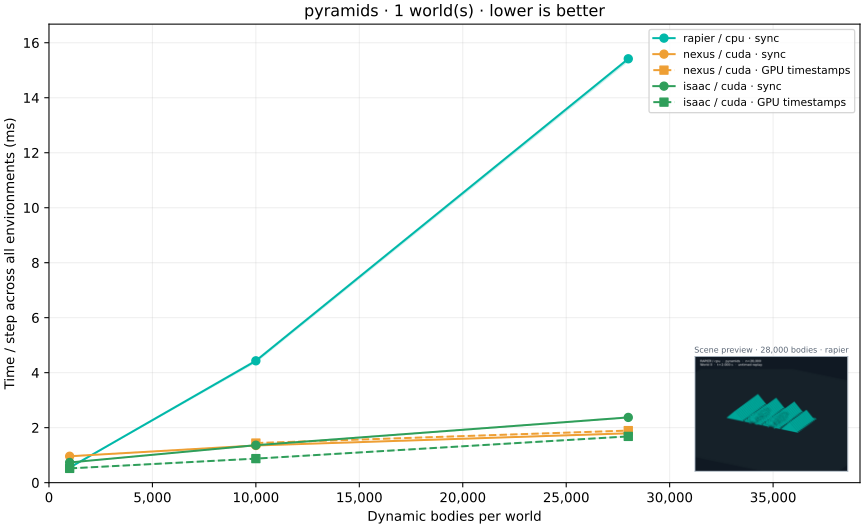
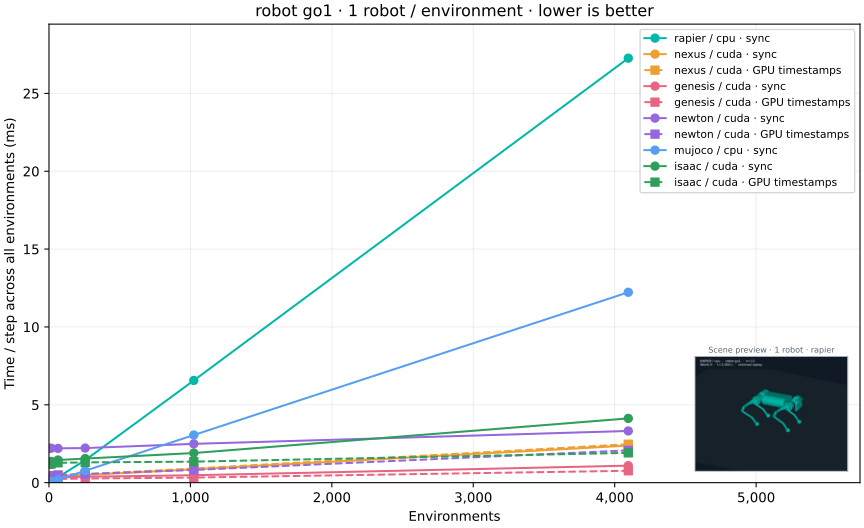
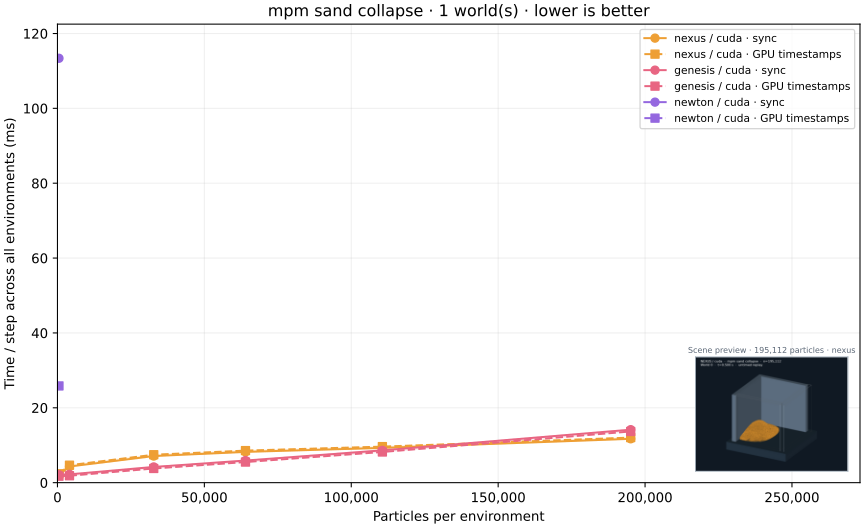
Currently, Physmark will run the benchmark on Nexus, Genesis, Newton, MJX, Isaac Sim using their GPU backends, and on Rapier and MuJoCo on the CPU. However, Newton, MJX, and Isaac Sim are ignored if the benchmark is run on a platform with no CUDA-compatible device. Whenever a simulation is run, a video capture of it is recorded and can be replayed in the benchmark report page to verify that what is being benchmarked is behaving as expected.
In some cases, a physics engine is not able to simulate a scene within a reasonable timeframe. We observed this to be the case for MuJoCo, MJX, Newton, and Genesis, which don’t scale well when the number of rigid-bodies in the scene is increasing beyond a few hundreds. This is likely due to their approach to solving constraints. When this happens, Physmark detects a timeout and ignores the corresponding datapoint. Rapier, Nexus, and Isaac Sim don’t suffer from this issue.
Conclusion
The past three months have been extremely busy, but we are very satisfied with the result. Significant performance improvements have been achieved on both Rapier and Nexus, making simulable worlds even larger, and making them very competitive, both in terms of features and performances, compared to other state-of-the-art physics engines. And all of this can be achieved while keeping all code, including GPU code, 100% in Rust.
But we aim to go beyond the state-of-the-art by offering new features like Rapier’s unique soft-bodies implementation, Nexus’ MPM implementations based on a sparse grid, Nexus’s ability to simulate both large-scale scenes as well as small-scale-multi-envs simulations for RL training. We are also on a path to making these libraries accessible to more communities by offering Python bindings (for Rapier and Nexus) and C bindings (Rapier only for now).
To finish the year 2026, we are looking forward to further improving Nexus by implementing the AVBD solver as well as two-way-coupling for MPM. We will look into a few more performance improvements, and continue on our 2026 goal of making our physics libraries better for robotics.
Acknowledgements
We cannot thank enough:
- Futurewei for sponsoring our physics work for robotics and AI.
- NGI Zero Commons Fund for accepting our grant proposal to further extend the solvers supported by Nexus.
- The maintainers of all the fantastic libraries we build on top of.


Thanks to all the former, current and new sponsors! This helps us tremendously to sustain our Free and Open-Source work. Finally, a huge thanks to the whole community and contributors!
** Credit: the car model from the "Plastic car chassis (3D)" demo video is Dune Hunter (taanX).
Help us sustain our open-source work by sponsoring us on GitHub sponsors or by reaching out ♥
Join us on discord!